Want to improve your WordPress Core Web Vitals? This guide makes it simple. I shared these tips at the WordPress Penang meet up and the WordPress Hong Kong meet up. The tips use plain language so new users can follow. Are you an advanced user? You can watch the Google video below.
How to Speed Up WordPress Performance for Page Speed Insights
My idea is simple. Less is MORE.
Speed Optimisation
is Not Difficult
You just need to focus 1 thing.
Keep page SMALL size.
Keep everything minimal.
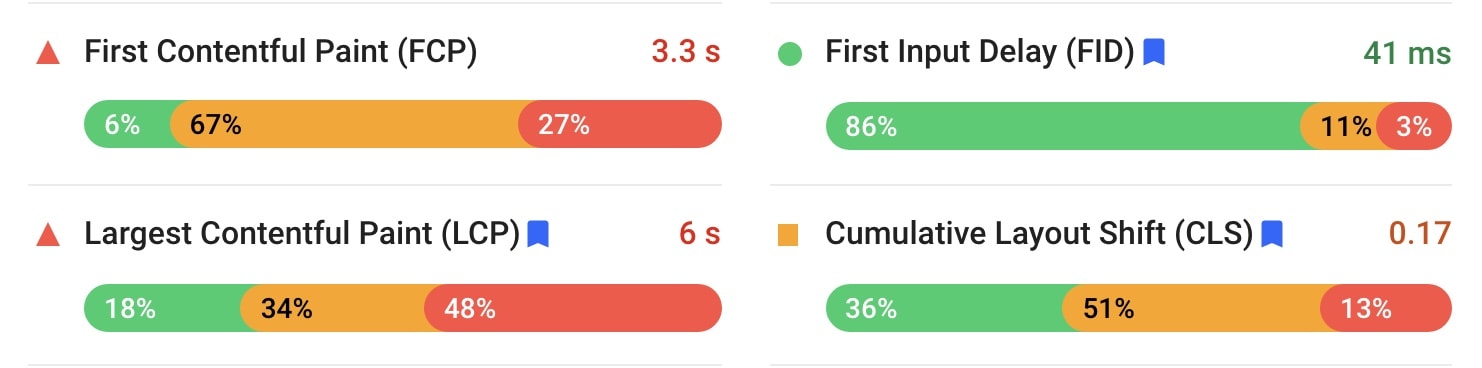
How to optimise for First Contentful Paint (FCP) / First input Delay (FID)
- Time To First Byte (TTFB) – use FAST web hosting
- Setup Cache – Swift Performance Pro / FlyingPress / Cache Enabler
- Inline the background image – CSS / Kadence Blocks
- Remove non-critical CSS/JS – perfmatters / Asset Cleanup
- Minify & Optimise CSS – Swift Performance Pro / FlyingPress /Autoptimise
- Generate Critical and Used CSS – Swift Performance Pro / FlyingPress / Autoptimise (with 3rd party service)
- Preload CSS – Blocksy / Kadence theme
- Defer JavaScript – Swift Performance Pro / FlyingPress / Async JavaScript
- Defer Inline JavaScript – Swift Performance Pro / FlyingPress / Autoptimise
- Delay 3rd party JavaScript – Swift Performance Pro / FlyingPress
- Self-host Google Font – Swift Performance Pro / FlyingPress or use System Font Stack
- Preload / prefetch DNS Queries – perfmatters / Swift Performance Pro
- Use CDN – Bunny
How to optimise for Largest Content Paint (LCP)
- Reduce element
- Don’t use slider
- Don’t use video background
- Image with correct dimensions
- Optimize the images – EWWW / ShortPixel
- Use WebP format – EWWW / ShortPixel / WebP Express
- Use lightweight graphic – SVG
- Inline & lazy load the background image – CSS / Kadence Blocks
- Fast Hosting like Rocket.net
How to optimise for Cumulative Layout Shift (CLS)
- Image with correct dimensions
- Ads, embeds and iframe with dimensions
- Self-host Google Font – Swift Performance Pro / FlyingPress or use System Font Stack
- Preload Fonts – Swift Performance Pro / FlyingPress / perfmatters
- Image add width & height attributes Swift Performance Pro / FlyingPress
Still feels confusing? Here are the key things you must do on your WordPress site. These steps help fix poor Core Web Vitals URLs. Try one fix at a time. Then test your score again.
Every site is different
You need to keep optimise to get Good Score
Optimize for Core Web Vitals – From Google
Are you an advanced user? Watch this short video from Google. It explains how to optimize Core Web Vitals in more depth.

Frequently Asked Questions About WordPress Core Web Vitals
What are Core Web Vitals in WordPress?
Core Web Vitals are three key speed metrics from Google. They are Largest Contentful Paint (LCP), First Input Delay (FID), and Cumulative Layout Shift (CLS). Each one measures how fast and smooth your page feels to a real user. Good scores can help your WordPress site rank higher in search results.
How do I check my WordPress Core Web Vitals score?
Use Google PageSpeed Insights or the Core Web Vitals report in Google Search Console. Both tools are free. Just enter your URL and wait for the report. You will see field data and lab data. Field data shows real user experience over the last 28 days.
Which WordPress plugin is best for Core Web Vitals?
There is no single best plugin. It depends on your setup. FlyingPress and Swift Performance Pro work well for most sites. Perfmatters helps remove bloat. Pair a caching plugin with a fast host. Then test, tweak, and test again.
Why is my LCP score poor?
A poor LCP score often comes from large hero images, slow hosting, or render-blocking CSS. Compress your images. Use modern formats like WebP. Preload your largest image. Then move heavy scripts out of the critical path.
How long does it take to improve Core Web Vitals?
Lab scores can change right away. Field data takes longer. Google uses a 28-day rolling window. So you may need to wait a month to see the full impact in Search Console. Keep optimizing during that time.
Final Tips to Keep Your WordPress Site Fast
Speed is not a one-time task. Every new plugin, image, or theme update can slow your site. Audit your site each month. Remove plugins you do not use. Keep your media library lean. Pick a lightweight theme like Kadence or GeneratePress. Above all, keep your pages small. Less really is more.
