If you’re a Malaysian business owner watching potential customers click away faster than you can say “please wait,” you’re not alone. Every extra second your website takes to load costs you real money—and in Malaysia’s competitive digital landscape, speed isn’t just nice to have anymore. It’s survival.

Why Website Load Speed Improvement Matters for Malaysian Businesses
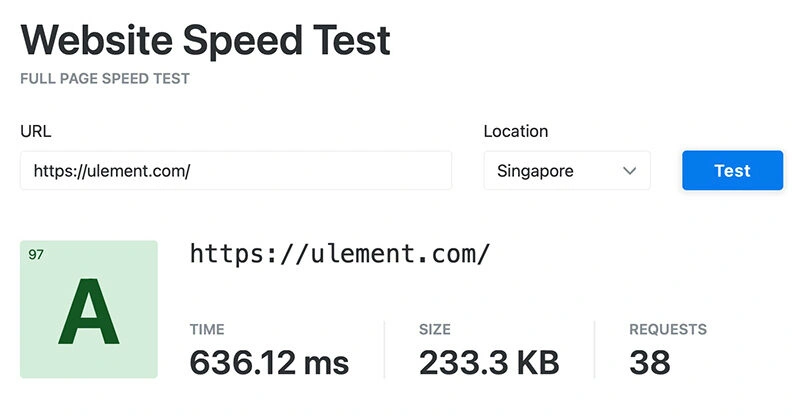
Impact on User Experience and Bounce Rate in Malaysia
Malaysian internet users expect instant gratification. With mobile internet penetration hitting 89% nationwide, your visitors are likely browsing on their phones during lunch breaks, commutes, or while waiting for their Grab ride.
Studies show that 53% of mobile users abandon sites that take longer than 3 seconds to load. In Malaysia, where mobile-first browsing dominates, this number climbs even higher. Your bounce rate directly correlates with load times:
- 1-3 seconds: 32% bounce rate
- 1-5 seconds: 90% bounce rate increase
- 1-6 seconds: 106% bounce rate increase
- 1-10 seconds: 123% bounce rate increase
Think about your own browsing habits. When was the last time you waited more than 5 seconds for a slow website to load?
SEO Benefits and Google’s Core Web Vitals for Local Search
Google treats page speed as a ranking factor, especially for mobile searches. Since most Malaysian businesses compete for local search visibility, this becomes critical for your bottom line.
Core Web Vitals – Google’s user experience metrics nclude:
- Largest Contentful Paint (LCP): Measures loading performance. Aim for under 2.5 seconds.
- First Input Delay (FID): Measures interactivity. Target under 100 milliseconds.
- Cumulative Layout Shift (CLS): Measures visual stability. Keep it under 0.1.
Poor Core Web Vitals scores don’t just hurt your rankings—they signal to Google that users don’t enjoy your site. In Malaysia’s competitive local search landscape, this can push you off the first page entirely.
Boosting Sales and Conversions in the Malaysian Market

Here’s where speed improvement gets interesting from a business perspective.
Amazon discovered that every 100ms improvement in load time increased revenue by 1%. For Malaysian e-commerce sites, this translates to significant ringgit increases. A local electronics retailer we worked with saw a 23% conversion rate increase after reducing load times from 6.2 seconds to 2.1 seconds. The math is simple: Faster sites convert better. Period.
Malaysian consumers, particularly in urban areas like KL and Penang, have grown accustomed to lightning-fast apps like Shopee and Lazada. Your website needs to match those expectations or risk losing sales to competitors who do.
How to Measure Your Website’s Current Load Speed
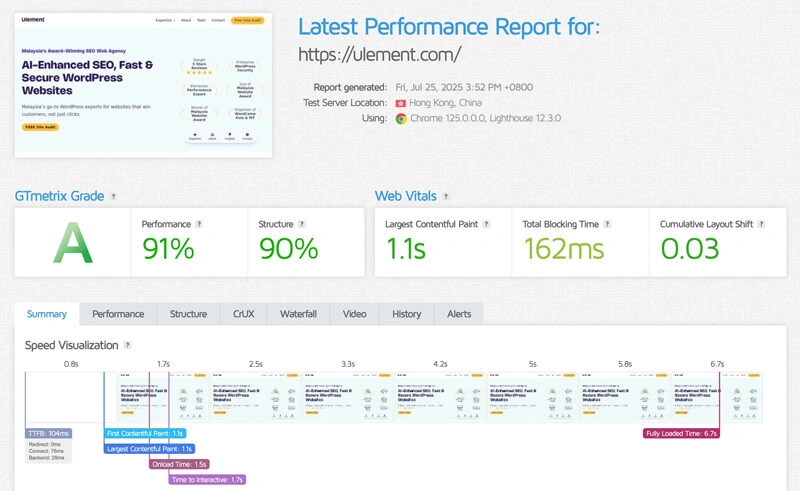
Before improving anything, you need baseline measurements. Think of this as your website’s health checkup.
Top FREE Website Speed Testing Tools:
Measuring and improving your website’s speed starts with the right tools. The best website speed testers deliver reliable data, actionable recommendations, and let you test from multiple locations, including Southeast Asia.
- Google PageSpeed Insights
Google’s official tool for both desktop and mobile speed audits.- Key Features: Core Web Vitals, optimisation tips, field data from real users in Malaysia (when available).
- Best For: Quick checks, SEO optimisation, validating Google search performance.
- WebPageTest.org
WebPageTest is a professional-grade, free tool trusted by developers worldwide.- Key Features: Test from over 40 global locations (including Singapore and Singapore ISPs for regional relevance!), choose desktop/mobile, and simulate different network speeds (3G/4G).
- Analysis: Waterfall charts, filmstrip loading sequences, Core Web Vitals scores, and step-by-step diagnosis.
- Best For: Anyone who wants real-world, in-depth testing—ideal before and after site changes.
- GTmetrix
Used to be an all time favorite for detailed diagnostics.- Key Features: Global test locations, waterfall breakdown, history, and actionable tips.
- Notes: Free users test from Canada; register a free account to access regional servers (e.g., Hong Kong).
- Best For: Deep dive, developer-focused breakdowns.
- Pingdom Website Speed Test
Simple, fast, and focused on user experience.- Key Features: Test from global locations, clear performance grade, break down by file type and request.
- Best For: Easy overview and benchmarking against competitors.
- KeyCDN Website Speed Test
Efficient, direct, multi-location tool often used to double-check your main test results.- Key Features: Test from Singapore, see requests, load time, and waterfall visualisation.
- Best For: Quick overview and benchmarking.
Tips for Malaysians:
- Try WebPageTest.org’s Singapore node for local perspective.
- Run tests at different times (peak/off-peak) for more realistic results.
- Combine tools: verify your scores and improvements with at least two platforms.
Regular speed tests are vital to maintain a fast, user-friendly, and Google-friendly site.
Understanding Key Metrics: LCP, FID, CLS, TTFB
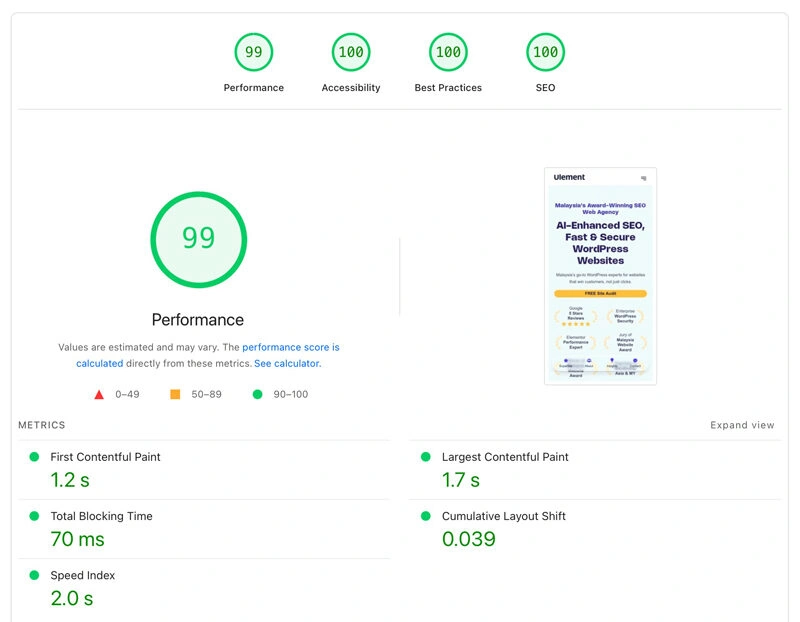
- LCP (Largest Contentful Paint): How long it takes for the main content of your page to load.
- FID (First Input Delay): How quickly your page responds when a user first interacts with it (like clicking a button).
- CLS (Cumulative Layout Shift): How much your page content unexpectedly shifts around as it loads. A high CLS is very annoying for users.
- TTFB (Time to First Byte): How long it takes for your server to send back the very first piece of information after a request.
Analyzing Test Results and Identifying Bottlenecks
Most Malaysian websites suffer from similar issues:
- Oversized images (often 70% of load time problems)
- Too many plugins or scripts
- Poor hosting performance
- Missing caching configurations
- Unoptimised code
Look for patterns across different testing tools. If all three tools highlight image optimisation, start there. If server response time appears consistently slow, your hosting needs attention.
Analysing Test Results and Identifying Bottlenecks
The test results will show you the main culprits. It’s often large, unoptimised images, slow server response times, or too many scripts trying to load at once. While these tools provide a great starting point, interpreting the data and identifying the root cause can be complex. For a professional diagnosis, our comprehensive Site Audit & Analysis provides a deep dive into every aspect of your site’s health and delivers a clear, prioritized action plan.
Practical Strategies for Website Load Speed Improvement in Malaysia

Optimize Images for Web Performance
Images typically account for 60-70% of page weight on Malaysian business websites. This presents your biggest optimisation opportunity.
Compression and Resizing Techniques
Never upload images larger than needed. That 4,000px product photo only needs to be 800px wide for web display.
For WordPress sites, plugins like eWWW or ShortPixel automate this process, handling compression as you upload images.
Implement Lazy Loading
Lazy loading delays image loading until users scroll near them. This dramatically improves initial page load times, especially for product galleries or blog archives.
Most modern themes include lazy loading, but older sites may need plugins or manual implementation.
Choose the Right Image Formats (e.g., WebP, AVIF)
- WebP images are 25–35% smaller than equivalent JPEGs while maintaining visual quality, which helps websites load much faster. Modern WordPress sites can automatically serve WebP to compatible browsers, while falling back to JPEG on older or less-supported browsers—important for Malaysia, where legacy devices and browsers are still in use.
- AVIF (AV1 Image File Format) is the newest, most advanced image format for the web in 2025—and it’s even more efficient than WebP. AVIF can deliver up to 50% smaller file sizes than JPEG and around 20–25% smaller than WebP for similar or better quality. It achieves this through cutting-edge compression and supports higher color depth, HDR, and better gradient handling (sharper, more detailed images with less banding).
Best practices:
- Use AVIF as your preferred format for maximum compression and quality, especially for high-resolution product images or photography.
- Use WebP as a “fallback” for browsers that do not support AVIF. JPEG/PNG should still be used as a final fallback for the small percentage of older browsers that do not support either modern format.
- Modern WordPress (with an image optimisation plugin or CDN) can automate serving AVIF to supported browsers, WebP as fallback, and JPEG/PNG as a final fallback. No manual work required for each image.
Minify and Combine CSS, JavaScript, and HTML Files
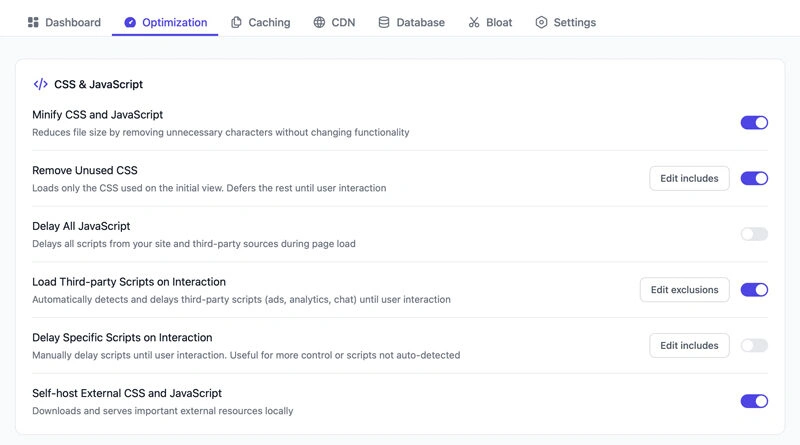
Code minification removes unnecessary spaces, comments, and formatting from your files. While each file only shrinks slightly, the cumulative effect significantly improves load times.
WordPress plugins like FlyingPress handle this automatically, combining multiple CSS and JavaScript files into single, compressed versions.
For those who are looking for FREE Speed Optimisation plugin, may consider Autoptimise + Cache Enabler or LiteSpeed Cache (LiteSpeed webserver user only).
Leverage Browser Caching and Server-Side Caching
Caching stores frequently-used data temporarily, reducing server work for repeat visitors.
- Browser caching: This tells a visitor’s browser to save a copy of your site’s files. When they visit a second page, their browser can load the files from its local storage instead of downloading them again.
- Server-side caching: This creates a saved, ready-to-go version of your web pages on the server, so it doesn’t have to rebuild the page from scratch for every single visitor.
For WordPress sites, caching plugins like FlyingPress provide significant improvements with minimal technical knowledge required.
Utilize a Content Delivery Network (CDN) for Global Reach
CDNs store copies of your site on servers worldwide, serving content from locations closest to each user.
Considering CDNs with Malaysian/Southeast Asian PoPs
For Malaysian businesses, choose CDNs with Points of Presence (PoPs) in Singapore, Hong Kong, or ideally, Malaysia itself.
Cloudflare offers excellent coverage in Southeast Asia with competitive pricing. FlyingCDN and BunnyCDN also provide strong regional performance.
Even if your primary audience is Malaysian, CDNs improve local performance by offloading static content delivery from your main server.
Choosing the Right Hosting Provider in Malaysia
Your hosting provider forms the foundation of website performance. Poor hosting undermines every other optimisation effort.
Importance of Local Data Centers for Malaysian Audiences
Physical distance between your server and users creates latency. A server in the US adds 200-300ms delay for Malaysian visitors—enough to noticeably impact user experience.
Malaysian hosting providers like Exabytes and ServerFreak offer local data centers. International providers like DigitalOcean and Vultr also have Singapore servers providing excellent performance for Malaysian users
Evaluating Hosting Types: Shared, VPS, Dedicated, Cloud
- Shared hosting: Suitable for small businesses with limited traffic. Multiple sites share server resources, potentially causing slowdowns during peak periods.
- VPS hosting: Provides dedicated resources at moderate cost. Ideal for growing businesses needing consistent performance.
- Dedicated servers: Entire servers dedicated to your site. Necessary for high-traffic sites or those requiring maximum performance.
- Cloud hosting: Scalable resources that adjust based on demand. Excellent for businesses with variable traffic patterns.
Optimising Server Response Time
A good host will use modern technology (like the latest PHP versions and fast databases) to ensure their servers respond to requests quickly. A slow TTFB is often a sign of poor quality hosting. For businesses with high-traffic sites or custom applications, moving to a powerful VPS or dedicated server is often the solution, but this requires expert oversight.
For these advanced setups, a professional Web Server Management service can ensure your infrastructure is perfectly tuned for maximum performance.
Reduce Server Requests and HTTP Requests
Every element on your page—images, stylesheets, scripts—requires separate server requests. Fewer requests mean faster loading.
Eliminate Unnecessary Plugins and Themes (Especially for WordPress)
Every plugin you add to your WordPress site adds more code and more potential server requests. Deactivate and delete any plugins you are not actively using. Sometimes, a slow site is caused by a fundamentally bloated or poorly coded theme. In these cases, while optimisations can help, the most effective long-term solution is often a full Website Redesign focused on a lightweight, modern foundation.
Clean Up Database and Reduce Redirects
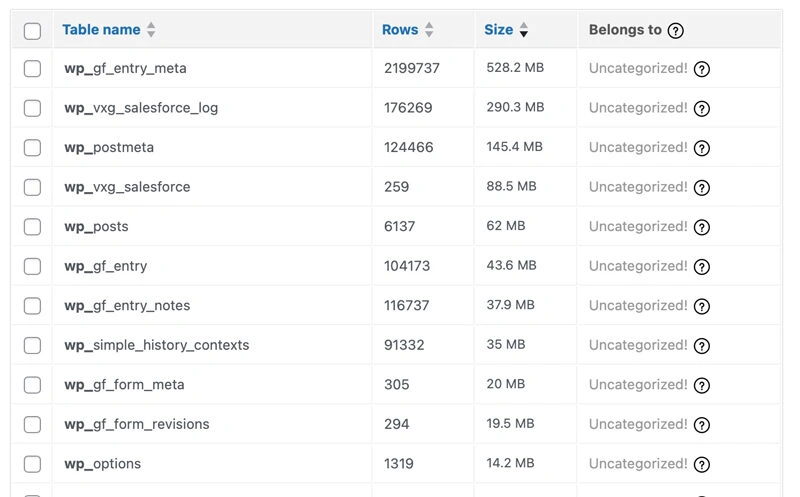
Over time, your website’s database can get filled with old, unnecessary data. Cleaning this up can improve your server’s response time. This task is a key part of a regular WordPress Maintenance & Support plan, which keeps your site’s foundation clean and efficient.
Implement Asynchronous and Deferred Loading for Scripts
y default, a browser will try to load all scripts before showing the main content. “Async” and “Defer” are methods to tell the browser to load certain scripts in the background, allowing the visible part of the page to appear much faster.
Optimise Mobile Performance (Responsive Design)
With so many Malaysians using their phones to browse, mobile performance is critical. Ensure your site has a responsive design that adapts well to small screens.
Monitoring and Maintaining Optimal Website Speed
Regular Speed Audits and Performance Tracking
Website performance changes over time. New content, plugins, or traffic patterns can gradually degrade speed.
Schedule monthly speed tests using the tools mentioned earlier. Monitor Core Web Vitals through Google Search Console for ongoing insights into real user experiences.
Set up alerts for significant performance changes—many hosting providers and monitoring services offer this functionality.
Staying Updated with Latest Web Performance Best Practices
Web performance best practices evolve constantly. Google regularly updates Core Web Vitals requirements, browsers introduce new optimisation opportunities, and hosting technologies improve. Follow industry blogs, attend WordPress meetups (Malaysia has active communities in Kuala Lumpur and Penang), and consider working with specialists who stay current with these changes.
Conclusion: Unlock the Full Potential of Your Malaysian Website
A fast website is no longer a luxury; it is a fundamental requirement for success. By investing in website load speed improvement, you are investing in a better user experience, better search engine rankings, and ultimately, a better bottom line for your business.
However, implementing comprehensive speed optimisation while running your business can feel overwhelming. Maybe you’ve tried some optimisations before without seeing dramatic improvements, or perhaps the technical aspects seem daunting.
Ready to accelerate your website’s performance and watch your conversions soar?
Choose the solution that fits your needs:
- Get Clear Insights First
Start with our comprehensive site audit to identify exactly what’s slowing down your site and get a prioritised action plan - Professional Speed Optimisation
Get dramatic, lasting speed improvements with our comprehensive speed optimisation service. We handle everything from image compression and caching to code optimisation and CDN setup. - Complete Website Transformation
If your site needs more than optimisation, our website redesign service builds speed and performance into your new site from day one. - Ongoing WordPress Care
Keep your optimisations working with our WordPress maintenance service. Regular updates, security monitoring, and performance tracking ensure your site stays fast and secure. - Enterprise Server Management
For high-traffic sites needing maximum performance, our server management service provides dedicated infrastructure optimisation and 24/7 monitoring.
Don’t let slow load times cost you another sale. Your competitors won’t wait, and neither should you.
Book your free consultation today and discover how we can transform your website’s performance for maximum conversions and profitability.
