Many Malaysian business owners treat WooCommerce stores like digital catalogues. They upload products, install a basic plugin, and wait. But passive WooCommerce SEO no longer works in the age of AI search and Large Language Models.
WooCommerce stores are complex, relational databases. AI answer engines scan the web and recommend products based on clean structured data, clear taxonomy, and fast performance. This WooCommerce SEO guide covers the technical foundations and advanced tactics you can apply today.
Is WooCommerce Good for SEO?
WooCommerce offers strong SEO capabilities. The platform gives full control over server responses, URL structures, and JSON-LD schema. This lets developers build fast, AI-readable storefronts.
WooCommerce benefits from WordPress’s mature SEO ecosystem. Store owners gain full control over meta titles, descriptions, canonical URLs, breadcrumbs, and XML sitemaps without requiring custom development. Closed-source SaaS platforms lock businesses into rigid structures; WooCommerce lets developers modify everything, making the platform the strongest choice for serious organic growth targets.
Why Should Malaysian Businesses Choose WooCommerce Over Marketplaces?
Malaysian businesses choosing WooCommerce over marketplaces build compounding organic equity, retain direct customer data ownership, and avoid marketplace platform fees, creating a sustainable long-term revenue channel.
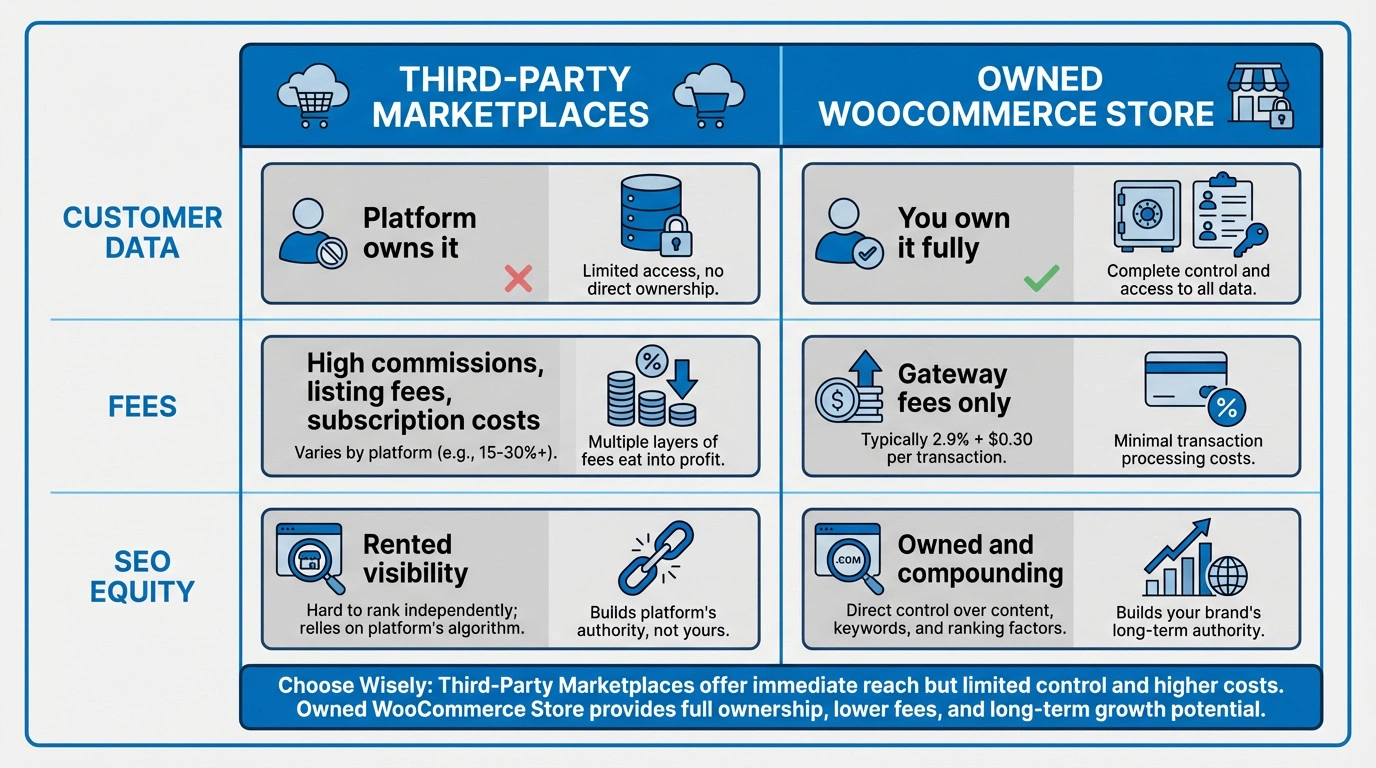
Shopee and Lazada dominate local ecommerce, but selling exclusively through these marketplaces forces sellers to compete on price alone. WooCommerce gives brands a direct-to-consumer organic channel to target localised queries like “kedai online Malaysia” or “free delivery Klang Valley.” Properly architected WooCommerce stores capture specific regional intent that standalone marketplace listings cannot replicate.
Why WordPress + WooCommerce is a Powerful Combination
WordPress and WooCommerce combine to offer native taxonomy control, flexible permalinks, and access to an extensive ecosystem of advanced SEO plugins that automate schema and sitemap generation.
WordPress powers over 40% of the web. The platform provides a robust SEO infrastructure and a massive community knowledge base. WooCommerce inherits custom post types and permalink flexibility natively. Plugins like Rank Math, Yoast, or SEOPress layer on advanced automation for breadcrumb schema and product-level meta boxes. Developers retain absolute control over the Document Object Model (DOM) and server responses.
What Are Common WooCommerce SEO Myths?
Common WooCommerce SEO myths include the belief that installing an SEO plugin fixes architectural issues, more products guarantee higher rankings, and tags are interchangeable with categories.
- WooCommerce is SEO-ready out of the box: The core software provides a foundation. Without permalink configuration, dedicated SEO plugins, and schema setup, stores lose significant ranking signals.
- Installing an SEO plugin fixes SEO: Plugins output metadata. Software cannot fix bloated code, repair poorly structured themes, or organise chaotic product taxonomies. Technical SEO requires infrastructural planning.
- More products mean more rankings: Thin or duplicate product pages harm crawl budgets. Quality and uniqueness matter significantly more than total catalogue size.
- Tags and categories are interchangeable: Categories carry hierarchy and authority. Tags typically generate low-quality archive pages requiring careful optimisation or noindexing.
Essential Technical SEO Setup for WooCommerce
Essential technical SEO setup for WooCommerce requires installing a lightweight theme, configuring an advanced SEO plugin, establishing logical permalink structures, enforcing HTTPS security, and submitting an XML sitemap.
Technical SEO secures the foundation of a digital storefront before product descriptions are written. Search engine crawlers determine visibility based on these foundational elements.
How Do You Choose a Fast, SEO-Friendly Theme?
SEO-friendly themes like Blocksy prioritise semantic HTML and load in under one second, ensuring AI crawlers can extract product data without exhausting token budgets on DOM bloat.
Marketplace templates bundled with unused plugins and page builders create massive Document Object Model (DOM) bloat. AI crawlers operate within strict token budgets; navigating thousands of nested <div> tags to locate a product price causes bots to abandon the page. Lightweight themes load quickly and prioritise clean code. Elementor users must combine performance-focused themes with optimised settings to pass Core Web Vitals.
Which SEO Plugin is Best for WooCommerce?
SEOPress PRO provides the best all-in-one WooCommerce integration with native GA4 Enhanced Ecommerce tracking and AI alt text generation, while Rank Math offers the strongest free alternative.
All major SEO plugins cover fundamental requirements, but specific configurations determine how cleanly the software outputs schema markup and enforces canonical rules.
| Feature | Yoast SEO | Rank Math | SEOPress PRO | AIOSEO |
| WooCommerce module | Paid add-on | Built-in (free) | Built-in (PRO) | Built-in (extended options) |
| Schema markup | Basic | Advanced (free) | Automatic product schema | Next-gen structures |
| GA4 Ecommerce | No | No | Yes (native integration) | No |
| AI alt text | No | No | Yes (built-in generation) | No |
| Image sitemaps | Yes | Yes | Yes (includes galleries) | Yes |
| Content scoring | Traffic light | 0-100 checklist | Clean meta box | Intuitive meta box |
| Target keywords | Premium only | Free | PRO | Free |
| Best for | Beginners | Power users | Agencies needing all-in-one | SMEs wanting balance |
How Do You Configure Permalinks for Products and Categories?
Store administrators configure permalinks in WordPress settings to use short, descriptive URLs like /%category%/%postname%/, providing clear keyword signals to search engines and users.
URL structures must be logical and descriptive. The default ?p=123 style provides zero keyword signal to search engines. Short, descriptive slugs such as /kasut-lelaki-malaysia/ or /running-shoes-men/ reinforce topical relevance. Administrators must set the post permalink structure to a clean format and define descriptive WooCommerce-specific bases.
How Do You Set Up SSL and HTTPS Security?
HTTPS security is enforced by installing a Let’s Encrypt certificate via the hosting cPanel and updating the WordPress Site Address, establishing encrypted connections required for ecommerce trust and search rankings.
E-commerce requires absolute trust. Browsers display a “Not Secure” warning if a store lacks a valid HTTPS connection, causing Google to withhold ranking consideration. Malaysian hosts such as Exabytes and Shinjiru offer free Let’s Encrypt certificates. Administrators must activate the certificate, enforce HTTPS sitewide via the .htaccess file or a plugin, and update WordPress general settings.
How Do You Create and Submit an XML Sitemap?
SEO plugins automatically generate XML sitemaps containing products, categories, and images, which webmasters submit to Google Search Console to guarantee rapid discovery and indexing of new inventory.
XML sitemaps act as structured roadmaps for AI crawlers. WooCommerce dynamically generates thousands of URLs. Submitting a clean, validated sitemap to Google Search Console ensures search engines discover new inventory immediately. SEOPress PRO auto-generates XML sitemaps containing product images, helping Google index visual content. Sitemaps must include product and category pages while excluding product tags and internal search results.
How Do You Conduct Keyword Research for Ecommerce?
Ecommerce keyword research targets high-intent transactional queries and specific long-tail product variations, prioritising user purchase intent and data extractability over raw search volume.
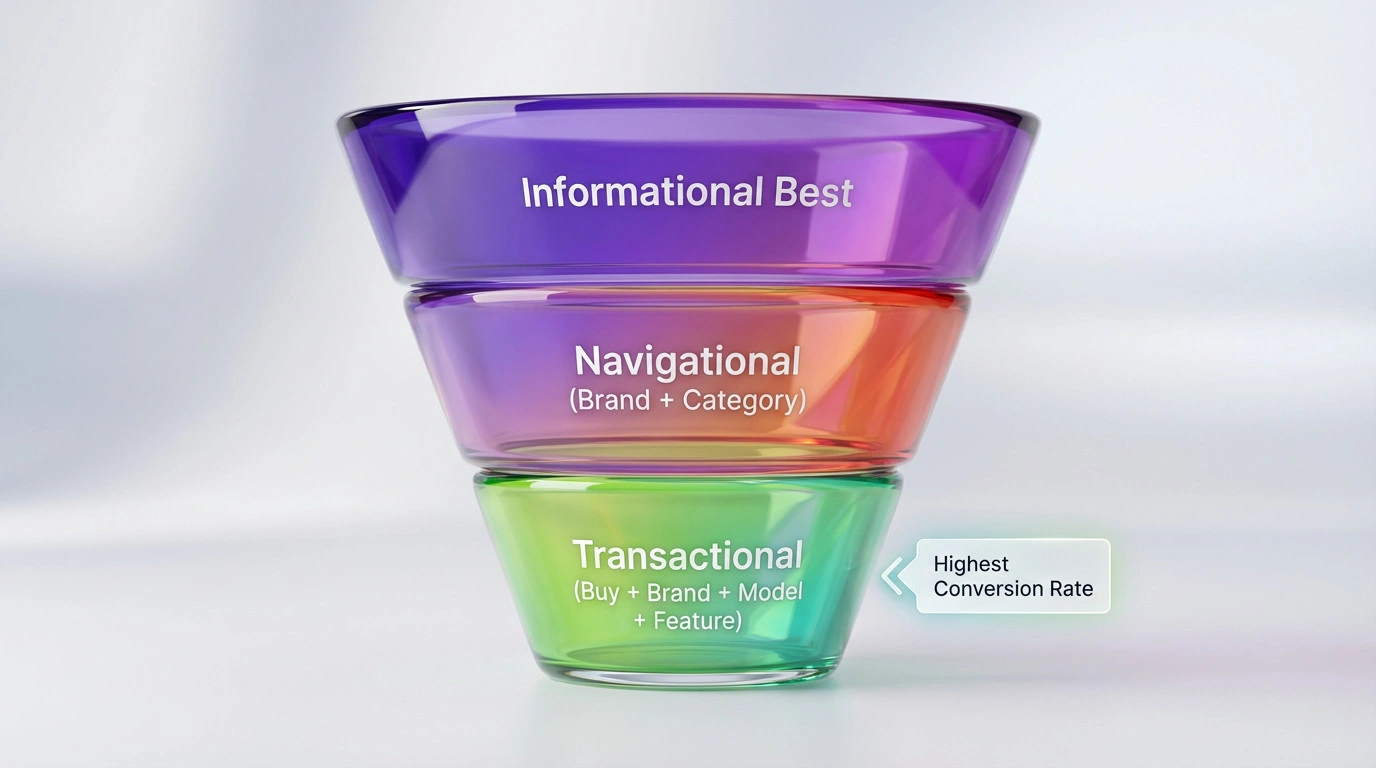
Standard keyword research focuses heavily on traffic volume. E-commerce keyword strategy must map directly to user intent and structured data requirements
How Do You Find High-Intent Transactional Keywords?
High-intent transactional keywords contain commercial modifiers like “buy”, “harga”, or specific model numbers, indicating the searcher is at the bottom of the funnel and ready to purchase.
Transactional keywords signal purchase intent and directly drive revenue. Users searching “best running shoes” are researching; users searching “beli Nike Pegasus 40 hitam saiz 10 Malaysia” have credit cards ready. Content strategists must target phrases with commercial modifiers to capture revenue.
| Tool | Cost | Best For | Key Capability |
| Google Search Console | Free | Immediate optimisation | Identifies queries already bringing clicks |
| Google Keyword Planner | Free with Ads | Search volume data | Localised keyword ideas for Malaysia |
| AlsoAsked.com | Freemium | Funnel mapping | Visualises question clusters |
| AnswerThePublic | Freemium | Topic exploration | Generates preposition-based queries |
| Google Autocomplete | Free | Localised context | Shows suggested completions regionally |
| Ahrefs / Semrush | Paid | Competitive analysis | Keyword difficulty and backlink data |
Why Are Long-Tail Keywords Important for Specific Products?
Long-tail keywords face lower competition and convert at higher rates because they match precise user requirements and provide exact answers for AI Retrieval-Augmented Generation models.
Long-tail keywords containing four or more words account for the majority of ecommerce searches. Phrases like “waterproof hiking boots size 10 wide” convert exceptionally well because the searcher’s intent is specific. Aligning product titles and semantic headings with these queries provides exact data points for AI bots.
Strategists use these patterns to build long-tail lists:
[product type] + [material/feature] + [location/use case](e.g., “ceramic coffee mug handmade Malaysia”)[brand] + [model] + [variant](e.g., “Nike Pegasus 40 black wide fit”)"best [product] for [specific need]"(e.g., “best ergonomic chair for home office under RM500”)- Bilingual variants where relevant (e.g., “kasut lari lelaki ringan” alongside the English equivalent)
How Do You Handle Product Variants and Keyword Cannibalisation?
Store owners resolve keyword cannibalisation among product variants by setting canonical tags on variant URLs pointing to the master product page, consolidating all link equity into a single destination.
Multiple variant URLs for size or colour compete for the exact same keywords. The optimal practice for most stores involves setting a canonical tag on every variant page pointing back to the master product page. The exception occurs when a specific variant has demonstrably unique search demand; in this scenario, developers implement a self-referencing canonical and differentiate the on-page content.
How Do You Optimise WooCommerce Product Pages for SEO?
WooCommerce product page optimisation requires entity-focused H1 titles, highly descriptive unique copy, AI-friendly image alt text, and concise short descriptions designed for conversion and schema extraction.
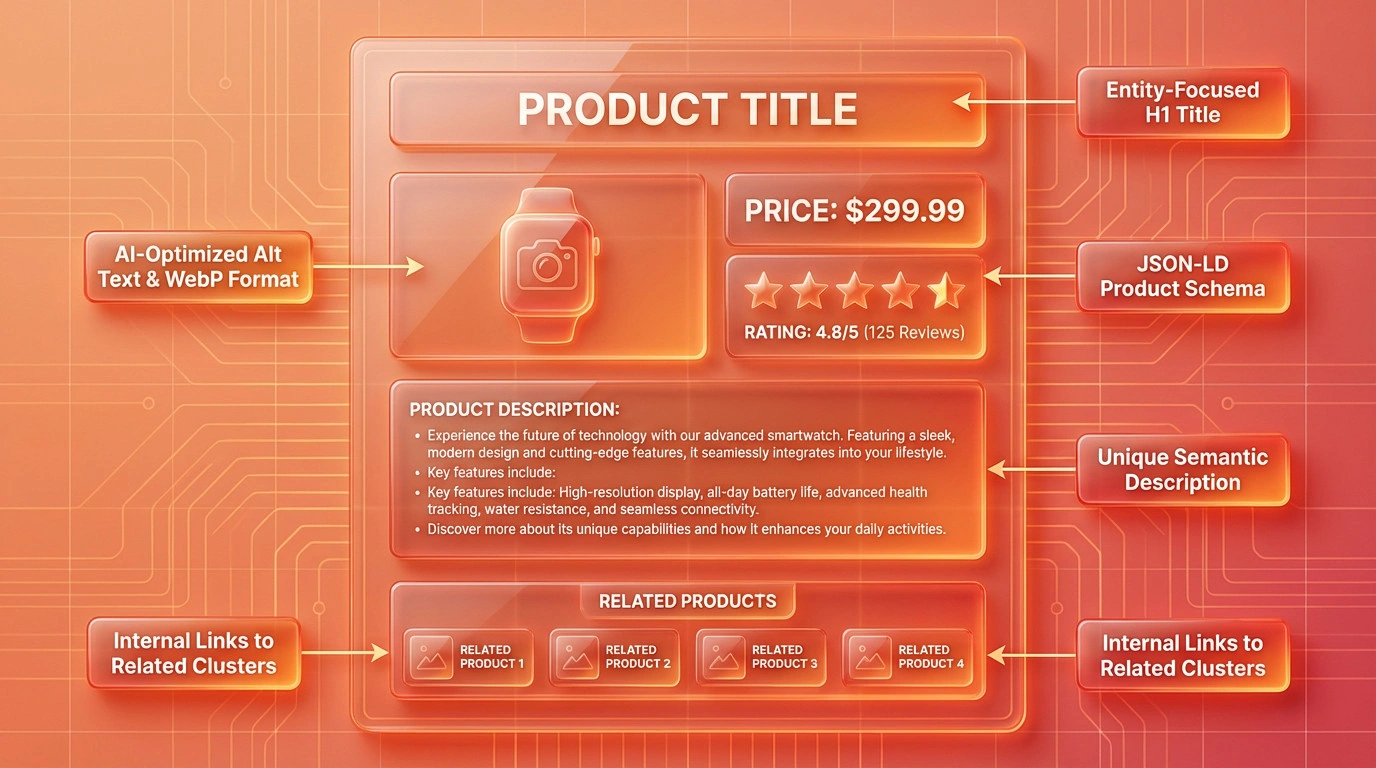
Product pages represent the critical intersection where architectural structure meets human psychology.
How Do You Write Click-Worthy Product Titles?
Product page titles must function as precise entities containing the brand, model, core feature, and product type within 60 characters to ensure maximum extractability for AI models.
Titles require an entity-focused structure. A title like “Sony WH-1000XM5 Wireless Noise Cancelling Headphones” is infinitely more extractable for an AI model than simply “Sony Headphones.” Copywriters must front-load the primary keyword within the first few words and include a descriptive attribute like colour or material.
How Do You Craft Unique Product Descriptions?
Store administrators must write original product descriptions of 150 to 300 words detailing use cases and materials, strictly avoiding manufacturer copy to prevent duplicate content penalties.
Search engines classify pages as duplicate content if stores copy and paste descriptions provided by manufacturers. Unique product descriptions detailing use cases, dimensions, and user benefits in natural language are mandatory. Content teams can leverage AI tools like ChatGPT or SEOPress PRO’s built-in generators to draft unique frameworks, provided human editors refine the final output.
How Do You Optimise Image Alt Text for Visual Search?
Descriptive image alt text formatted as [Brand] [Product Name] [Attribute] improves rankings in Google Image Search and visual AI shopping feeds while satisfying WCAG accessibility requirements.
Search engines read underlying code rather than seeing images visually. Descriptive alt text like AudioTech wireless Bluetooth headphones black outperforms generic terms. SEOPress PRO includes built-in AI alt text generation to automate this process. Webmasters must compress all product images to WebP or AVIF format to prevent Largest Contentful Paint (LCP) failures.
How Do You Use Short Descriptions for Conversion Optimisation?
WooCommerce short descriptions act as rapid summaries for human buyers and structured data snippets for AI bots, requiring two to three sentences highlighting the core product benefit.
The short description field appears directly next to the “Add to Cart” button. Copywriters must use this highly visible real estate to highlight compelling benefits, address purchase objections, and include a long-tail keyword naturally.
How Do You Manage Out-of-Stock Products Properly?
Webmasters manage out-of-stock products by marking temporary shortages in schema, 301 redirecting permanently discontinued items, or noindexing seasonal products to preserve valuable accumulated backlinks.
Deleting an out-of-stock product page destroys accumulated backlinks and ranking history by creating a broken 404 error. Administrators must apply specific strategies based on restock timelines:
- Temporarily out of stock: Keep the page live, add a restock notification form, and mark with
availability: OutOfStockin schema. - Discontinued permanently: 301 redirect to the closest relevant category or replacement product.
- Seasonal products: Set to
noindexduring off-seasons and re-enable when restocked to preserve crawl budgets.
How Should You Structure WooCommerce Site Navigation?
Proper WooCommerce site structure uses optimised category pages, hierarchical breadcrumbs, and semantic internal linking to establish clear entity relationships and distribute topical authority throughout the domain.
Flawless site structure acts as the foundation of Entity SEO. Search engines rely on site architecture to understand exactly how topics relate to one another.
How Do You Optimise Product Categories and Tags?
Category pages require unique 150-word descriptions and optimised H1 titles, while tag pages should generally be noindexed to prevent index bloat and crawl budget waste.
Categories function as the broad departments of a store. These pages require full SEO treatment, including unique descriptions and internal links to subcategories. Tags represent specific micro-details and are best utilized strictly for filtering within category archives. Creating hundreds of overlapping tags generates index bloat. Administrators must set non-essential tag pages to noindex via their SEO plugin.
How Do You Implement Breadcrumbs for User Experience and Crawlers?
Breadcrumbs generate a navigational trail for users and provide search engines with a machine-readable map of internal link structures via BreadcrumbList schema markup.
Breadcrumb links provide human users with an easy navigation pathway. These semantic markers also give search engines a clear map of internal hierarchies. SEOPress PRO includes native WooCommerce breadcrumb support, configurable directly from the plugin settings without additional code editing.
What Are the Best Internal Linking Strategies for Ecommerce?
Store owners must manually build semantic relationships by linking from blog posts to product pages, utilising “frequently bought together” sections, and identifying orphaned pages via SEO plugins.
- Linking from blog posts to relevant product pages using descriptive anchor text.
- Featuring related products and “frequently bought together” blocks on every product page.
- Adding internal links between logically related categories to reinforce topical clusters.
- Internal links transfer authority from high-traffic pages to conversion pages and pass entity salience throughout the site. Key tactics include:
- Using internal linking suggestions available in SEOPress PRO or Rank Math to identify orphaned product pages.
What Are Advanced WooCommerce SEO Strategies?
Advanced WooCommerce SEO requires implementing automated JSON-LD product schema, centrally noindexing faceted filter URLs to prevent duplicate content, and optimising server infrastructure for Core Web Vitals compliance.
Dominating competitive retail markets requires moving beyond basic settings. Store owners must execute enterprise-level technical engineering to outrank established competitors.
How Do You Implement Product Schema Markup?
Product schema markup translates store inventory into JSON-LD format, explicitly defining price, availability, and aggregate ratings so AI search engines can display rich snippets in organic results.
Schema markup serves as the vocabulary of AI search. SEOPress PRO handles product schema automatically by adding Product Global Identifier fields to the Inventory tab. Complete Product schema objects explicitly define critical data points, allowing Google to display products in rich snippets and organic shopping carousels. Webmasters must validate all code using Google’s Rich Results Test.
How Do You Fix Duplicate Content Issues with Canonical Tags?
Webmasters prevent duplicate content penalties caused by faceted navigation filters by setting centralised noindexrobots meta tags on parameter-based archive URLs via an SEO plugin.
Faceted navigation filters allow users to sort by size, colour, and price, but generate new dynamic URLs with every click. Search engines crawling these thousands of permutations assign duplicate content penalties. SEOPress PRO allows administrators to set centralized noindex tags on filtered archive pages from a single dashboard. Regular audits with Screaming Frog catch remaining parameter-based duplication.
How Do You Optimise Site Speed and Core Web Vitals?
Optimising Core Web Vitals requires compressing images to WebP, delaying non-critical JavaScript, removing unused CSS via plugins like FlyingPress, and enabling server-side Redis object caching.
Google evaluates Core Web Vitals as a direct ranking signal. Stores achieving Largest Contentful Paint (LCP) times below 2.5 seconds observe significantly higher conversion rates. Performance optimisation plugins like FlyingPress excel at removing unused CSS and lazy rendering HTML sections.
| Metric | Good | Poor |
| LCP (Largest Contentful Paint) | ≤ 2.5s | > 4.0s |
| INP (Interaction to Next Paint) | ≤ 200ms | > 500ms |
| CLS (Cumulative Layout Shift) | ≤ 0.1 | > 0.25 |
High-impact WooCommerce performance fixes include:
- Converting product images to WebP or AVIF formats.
- Disabling WooCommerce cart fragments on non-cart pages via advanced caching settings.
- Using critical CSS generation to eliminate render-blocking resources.
- Delaying non-critical JavaScript (like chat widgets) until user interaction occurs.
- Enabling Redis object caching via the hosting control panel or plugins like Object Cache Pro, and upgrading the server to PHP 8.3+.
- Pairing caching plugins with a Content Delivery Network (CDN) like Cloudflare.
How Do You Leverage User Reviews for Fresh Content?
Verified user review systems automatically inject unique, keyword-rich content and attribute data onto product pages, satisfying search engine preferences for fresh content and populating aggregateRating schema.
Search engines heavily prioritise fresh, updated content. Verified user reviews constantly refresh product pages with natural language and specific use cases. This user-generated text feeds the aggregateRating schema, strengthening rich snippet eligibility. Store managers should respond to reviews publicly to add additional indexed text.
How Does Content Marketing Support a WooCommerce Store?
You cannot rank an entire domain using only product pages. You need informational content to capture buyers early in their journey and build the topical authority that lifts rankings across your entire catalogue.
Starting a Blog to Capture Informational Intent.
Content marketing builds domain-wide topical authority by using blog posts, buying guides, and comparison pages to capture top-of-funnel informational queries before users are ready to purchase.
Publishers cannot rank an entire domain using only product pages. Informational content captures buyers early in their journey and builds topical authority.
How Do You Start a Blog to Capture Informational Intent?
A strategic ecommerce blog targets informational modifiers like “how to” or “best”, capturing early research traffic and routing users to product pages via contextual internal links.
Blogs capture the top of the purchase funnel. Content strategists shift keyword intent modifiers from “buy” to informational questions. Free tools like Google autocomplete and AlsoAsked identify these queries efficiently. Writers then convert readers using contextual links pointing to relevant product or category pages.
How Do You Create Buying Guides and Comparison Pages?
Buying guides and versus pages capture high-intent mid-funnel traffic by providing objective, structured product comparisons optimised with FAQPage or Article schema.
Comparison pages like “Wired vs. Wireless Headphones” capture queries that standard product pages cannot rank for. Objective, structured comparisons position brands as industry authorities and attract editorial backlinks from review sites. Developers structure these pages with appropriate schema and clear internal links.
How Do You Track WooCommerce SEO Performance?
Enhanced Ecommerce is implemented effortlessly via SEOPress PRO’s direct integration, which automatically pushes purchase, product view, and cart events directly to Google Analytics.
Administrators must choose the integration path matching their store’s complexity.
Path A: SEOPress PRO Direct Integration
SEOPress PRO includes built-in GA4 Enhanced Ecommerce tracking requiring no Google Tag Manager configuration:
- Navigate to the SEO dashboard and open the Google Analytics tab.
- Enter the GA4 Measurement ID in the tracking field.
- Enable ecommerce options for measuring purchases, product views, and cart events.
- Save changes and clear the server cache.
- Verify events are flowing via the GA4 Realtime report.
Path B: GTM4WP + Google Tag Manager
Agencies managing multiple tracking pixels utilise GTM4WP:
- Install GTM4WP and enter the GTM Container ID.
- Enable “Track Enhanced Ecommerce” in the integration tab to push events to the dataLayer.
- Store the GA4 Measurement ID in a GTM Constant variable.
- Create a Google Tag using the Measurement ID.
- Create a GA4 event tag attached to the ecommerce trigger.
- Enable Enhanced Measurement in GA4 admin settings.
- Test transactions via GA4’s DebugView before publishing.
How Do You Use Google Search Console to Find Errors?
Webmasters use Google Search Console as a diagnostic dashboard to identify crawl anomalies, fix mobile usability failures, and monitor Core Web Vitals compliance before they impact organic sales.
Google Search Console serves as the primary source of ground-truth data. Reviewing reports weekly prevents technical failures from destroying revenue. Checklists should include:
- Performance report: Finding keywords ranking in positions 5 to 15 and optimising those specific pages.
- Coverage report: Fixing unexpected “Excluded by noindex” and “Crawled but not indexed” statuses.
- Core Web Vitals report: Identifying pages failing LCP or INP thresholds.
- Rich Results report: Confirming product schema remains eligible and error-free.
Stop Guessing. Start Engineering.
A WooCommerce store built on bloated templates and broken category links is a depreciating digital asset. In an ecosystem where AI models demand perfectly structured data to formulate answers, and where Malaysian buyers increasingly compare products through AI-powered answer engines before visiting any store, technical errors are silent revenue killers.
If you are unsure whether your store is architecturally sound, Ulement’s Site Audit & Analysis uncovers DOM bloat, faceted navigation errors, and the deep structural flaws quietly draining your e-commerce traffic, delivered as a prioritised action plan, not just a list of problems. For stores that require ongoing infrastructure assurance, our Website Maintenance service handles the continuous health checks needed to keep your WooCommerce store secure, fast, and perfectly optimised for organic and AI search.
