Competitive WordPress SEO analysis is a strategic process where site owners evaluate rival websites to identify ranking opportunities and content gaps. By utilising a comprehensive SEO plugin (such as SEOPress), you can implement the specific on-page structures and schema markups that mimic proven competitor strategies. This methodology reduces risk by aligning with the principles of mastering SEO, GEO, and AEO and focusing resources on optimising your site against high-ROI benchmarks.

Why Run a Competitive WordPress SEO Analysis
What is the “Reverse Engineering” SEO Strategy?
Reverse engineering in SEO is a methodology where analysts deconstruct high-ranking competitor pages to replicate their success signals. Site owners apply this technique to configure their own titles, meta descriptions, and schema to match the patterns satisfying Google’s algorithms. Instead of guessing what works, you align your WordPress configuration with the evidence already on the first page.
Question: Why use reverse engineering for SEO? Answer: The primary benefit is risk reduction. By analysing successful competitors, you identify proven entity relationships and content formats. This approach shortens the timeline to ranking by eliminating trial-and-error in your WordPress strategy.
How Do You Identify Low-Hanging Fruit and Content Gaps?
Content gaps are topics or keywords your rivals rank for, but your WordPress site misses. Low-hanging fruit are the keywords with solid search volume and weak competition. To spot them quickly, look for:
- Keywords where rivals rank on page 2 or 3 (per Google’s SEO Starter Guide).
- Questions in “People Also Ask” that no competitor answers well.
- Topics your rivals cover, but you do not.
- Pages with thin content or poor Core Web Vitals you can beat.
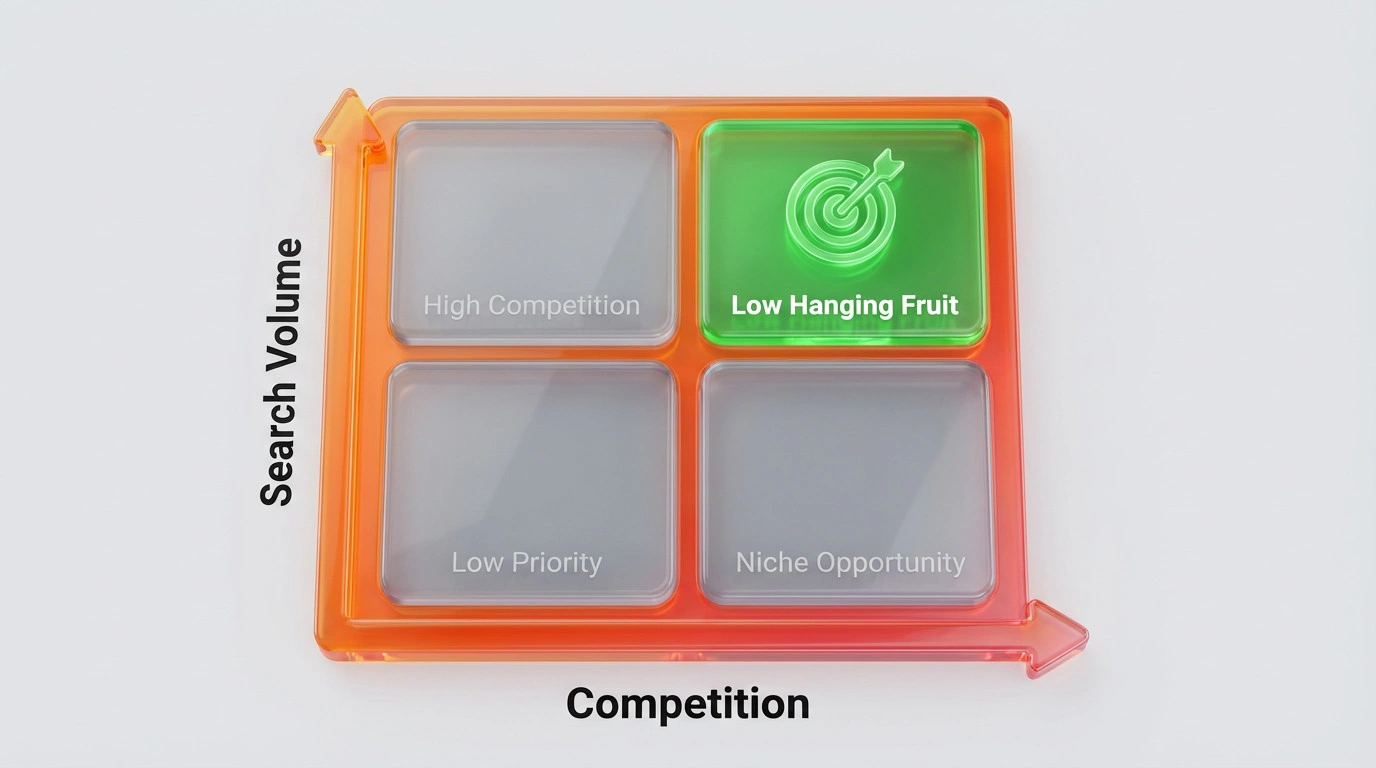
It is like finding a back door into the search results. While everyone else fights for the main entrance (high-difficulty keywords), you slip in through the side with specific, under-served queries.
Essential Tools for Competitor Analysis in WordPress
Which Native WordPress Plugin Should You Use?
A robust SEO plugin is essential for implementing on-page competitive strategies and technical auditing. While many options exist (e.g. AIOSEO, Yoast, RankMath), selecting a tool like SEOPress allows for superior schema management and lightweight code essential for matching competitor Core Web Vitals. You need specific metadata controls to manually align your site with the technical standards of market leaders.
What External Intelligence Tools Are Necessary?
External intelligence tools are SaaS platforms like Semrush, Ahrefs, and SpyFu that provide data on competitor backlinks and keyword rankings. These tools act as your radar, showing you the “invisible” data that your local SEO plugin does not track, such as domain authority and historical traffic trends.
You probably do not need all of them. Picking one robust tool like Ahrefs usually provides enough data to inform your WordPress configuration and content strategy.
Which Free Browser Extensions Aid Quick Audits?
Browser extensions are lightweight software add-ons that reveal on-page SEO data such as headers, metadata, and pixel tags. Tools like SEO Minion or the Detailed SEO extension allow you to instantly view a competitor’s heading hierarchy. This immediate insight helps you structure your own WordPress posts to compete effectively.
Step 1: Analysing Competitor Keyword Strategies
How to Find High-Volume, Low-Competition Keywords?
Keyword analysis is the practice of evaluating search terms based on their popularity (volume) and ranking difficulty. The goal is to find “sweet spot” keywords where the user intent is clear, but the current results are thin or outdated.
Question: How do I find low-competition keywords? Answer: Use external tools to filter competitor keywords by “Keyword Difficulty” (KD) under 30. Look for long-tail queries. Apply these terms to your SEO plugin’s title tags and meta descriptions to target accessible traffic.
How to Map Competitor Keywords to Your WordPress Categories?
Keyword mapping is the strategic assignment of specific search terms to relevant WordPress categories or pages. This ensures that your site architecture mirrors the successful topical clusters of your competitors. If a rival has a dedicated category for “Technical SEO,” and it drives traffic, you should likely consider a similar structure.
Step 2: On-Page SEO and Content Structure Comparison
How to Evaluate Heading Structures (H1-H6) and Meta Tags?
Heading structure analysis is the review of a webpage’s HTML tags to understand its information hierarchy and entity focus. Your WordPress SEO tool makes it simple to optimise your own H1s and H2s to match the semantic depth of top-ranking rivals found during your audit. Before making major structural changes based on these findings, conducting a full website SEO audit
ensures you don’t lose existing ranking signals while trying to improve them.
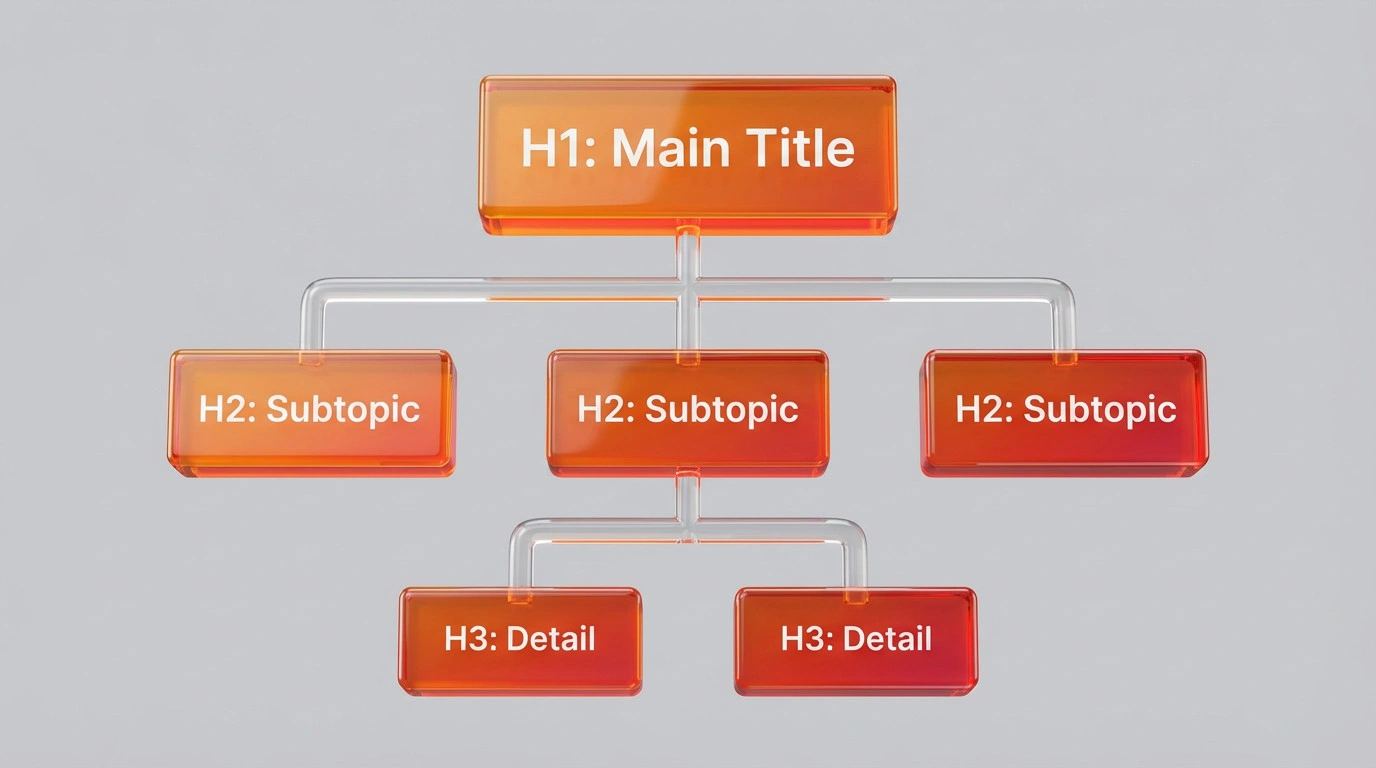
If your competitor uses H2s as questions (e.g., “What is X?”), they are likely targeting Answer Engine Optimisation (AEO). You should adopt a similar pattern to compete for those rich snippets.
How to Analyse Content Length and Media Usage?
Content velocity is a manual assessment comparing the depth, word count, and media richness of your page against competitors. Search engines often correlate comprehensive coverage (higher word count, more images) with topical authority. Use your plugin’s content analysis checklist to verify your post meets or exceeds the word count of the top-ranking result.
How to Check for Schema Markup and Rich Snippets?
Schema markup is a code vocabulary that helps search engines understand the explicit relationships between entities on a page. Advanced plugins excel here, allowing you to implement FAQ, Article, or Product schema types that competitors are using to dominate SERPs. To further aid AI discovery beyond standard schema, you should learn what is llms.txt and how it acts as a direct interface for Answer Engines like ChatGPT and Perplexity.
Question: Why is schema markup critical? Answer: Schema markup increases the probability of earning Rich Results (stars, FAQs, images). These visual enhancements improve Click-Through Rate (CTR). Your SEO plugin automates this implementation, ensuring your WordPress site speaks the same technical language as Google.
Step 3: Technical Performance and UX Benchmarking
How to Compare Core Web Vitals and Site Speed?
Core Web Vitals are a set of specific factors that Google considers important in a webpage’s overall user experience. If a competitor’s site loads in 1.2 seconds and yours takes 4 seconds, they will likely outrank you even with inferior content. You must fix WordPress security and speed issues to ensure your Core Web Vitals meet the new threshold for top rankings, as slow sites are often penalised regardless of content quality.
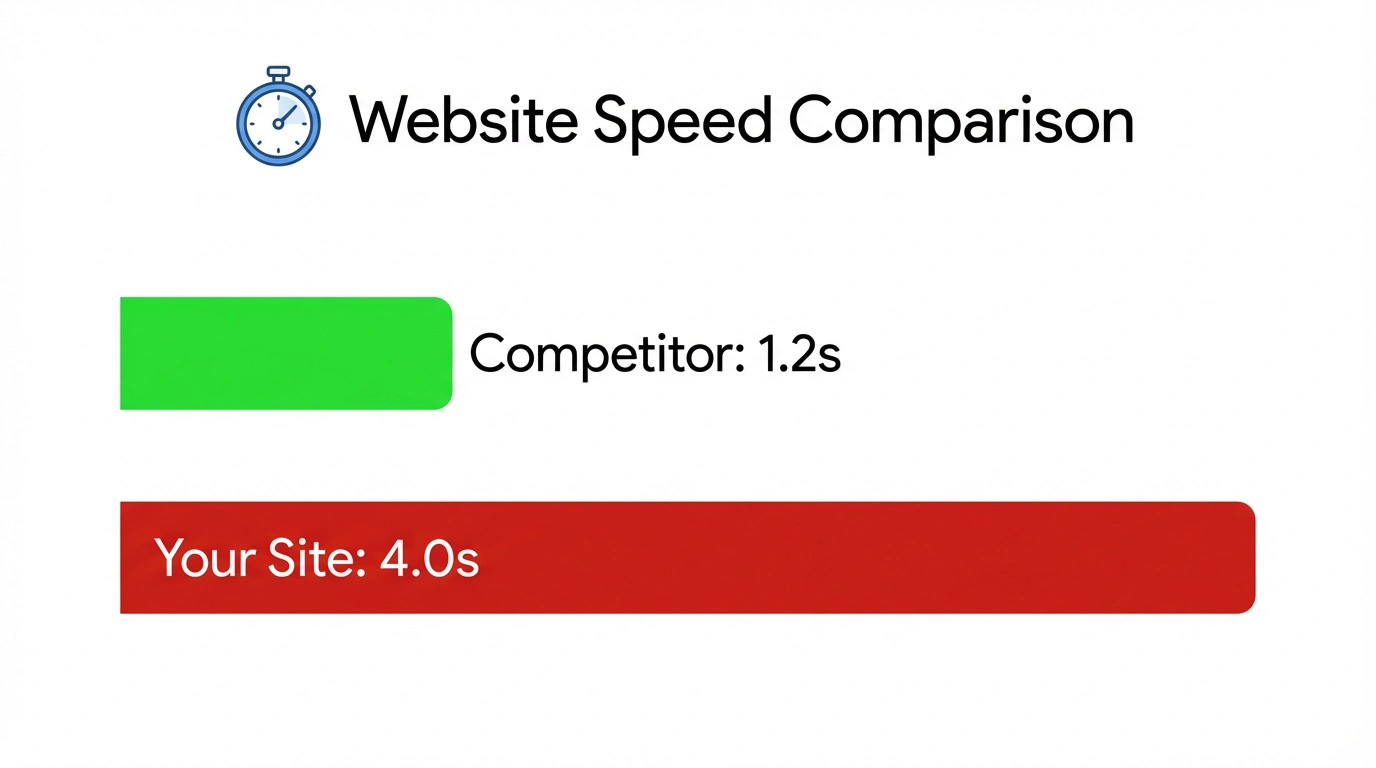
If your competitor’s site is significantly faster, understand that a website revamp is reengineering
the code, not just changing the look, to achieve those performance gains.
How to Analyse Mobile Responsiveness and Theme Performance?
Mobile responsiveness is the capability of a website to adapt its layout and functionality to different screen sizes. With Google’s mobile-first indexing, a competitor with a better mobile UX has a significant advantage. Check their font sizes and button placements on a phone; if theirs are easier to tap, you have a UX gap to close.
Step 4: Off-Page Analysis and Backlink Profiling
How to Identify Competitor Link Sources?
Backlink profiling is the examination of the quantity and quality of external websites linking to a competitor. These links act as votes of trust. If a rival has a link from a major industry news site, that single link might be the reason they rank #1.
How to Find Broken Link Building Opportunities?
Broken link building is a tactic where you find dead links on external sites that point to your competitors and suggest your content as a replacement. This is a high-value strategy because you help the webmaster fix an error while gaining a powerful backlink.
Implementing Your Findings Directly in WordPress
How to Optimise Existing Posts Based on Competitor Data?
Content re-optimisation is the process of updating older posts to reflect new keyword data and competitive standards. Use your SEO plugin’s content analysis to adjust your meta titles, descriptions, and internal links to align with the gaps you found.
Question: How often should I re-optimise content? Answer: The ideal frequency is every 3 to 6 months. Review competitor movements and update your focus keywords. This timeline ensures your WordPress content remains relevant and defends against ranking decay.
How to Create “Skyscraper” Content to Fill Gaps?
The Skyscraper Technique is a content creation method where you find high-performing competitor content and create a significantly better version. If they list “10 Tips,” you list “20 Tips” with better data and custom graphics.

By using your SEO plugin to ensure technical perfection on this new “Skyscraper” post, you combine superior value with superior coding. This is the ultimate way to displace an entrenched competitor.
Conclusion: Turning Analysis into Action
Competitive analysis is not about copying; it is about strategic improvement. By using your chosen SEO tools to implement these findings, you transform raw data into a clear roadmap for higher rankings. Start by fixing your technical gaps, then move to outperforming their content quality.
However, analysis is only the first step. Execution is where rankings are won.
Ready to stop guessing and start ranking? Don’t let competitors dominate your niche. Partner with Ulement for a data-driven SEO strategy that targets high-value entities and technical perfection.
