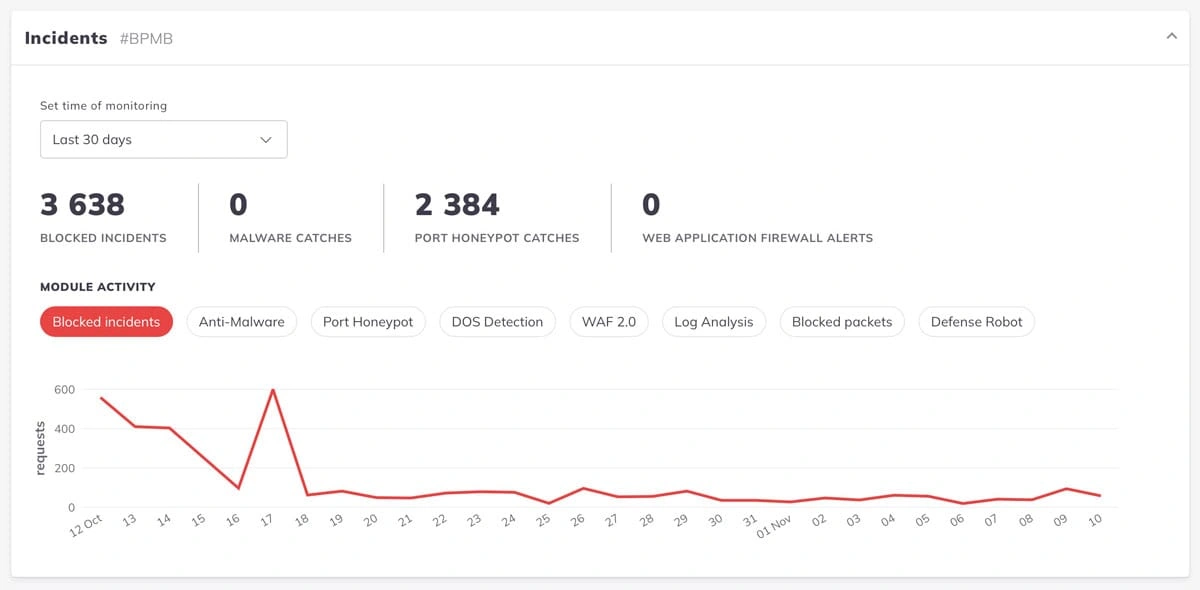
As a Malaysian business owner, your website is one of your most critical assets. But in 2025, it’s also a primary target for security threats. The key takeaway from this guide is that security is not just a single WordPress plugin you install; it’s a continuous process of layered defense. Relying on one tool or a ‘set and forget’ mindset is a near-guarantee of a future breach.

Who this guide is for
This guide is for Malaysian SMEs, enterprises, agencies managing client sites, and high-volume WooCommerce store owners who understand that a website breach, including ddos attacks, means lost revenue, lost customer trust, and potential legal penalties under the PDPA, especially when managing a WordPress dashboard.
TL;DR / Quick Summary
If you have a WordPress site in Malaysia, there is a real risk to your website due to potential security vulnerabilities. This is true whether you run it for business, ecommerce (WooCommerce), education, or the public sector. Your website can face problems from hackers, scams, malware, and data leaks. To ensure your site remains secure, you need to keep it updated with the latest version of WordPress. Security is not a job where you just add a plugin and forget about it. You need to look after it all the time.
Top actions that slash your risk:
- Turn on 2FA on all admin accounts using secure login credentials.
- Keep your site safe by using a cloud-based firewall like Cloudflare.
- Update your site, plugins, themes, and WordPress cores every week.
- Remove any plugins or themes you do not use.
- Use automated backups that are kept off site and check them every month.
- Make sure everyone uses strong passwords and only let certain IPs reach your admin area, especially on the login page.
Using just one plugin or a cheap “security package” will not be enough. You have to have a plan that has many steps and keeps going over time.
Who This Guide Is For
- Malaysian SMEs and enterprise website owners
- Agency teams who manage client WordPress sites
- WooCommerce or eCommerce operators
- Site owners who have legal or PDPA, PCI DSS rules to follow
- Anyone who wants to protect against loss of revenue. Anyone who wants to stop damage to their brand or stop customer data from getting out
Key Takeaways for Malaysian WordPress Owners
- About 96% of WordPress problems come from plugins, which can contain malicious scripts related to the content management system. The main system is not the problem.
- In 2025, hackers use automatic tools. They go after local businesses, WooCommerce sites, and even school or government websites.
- Many people set up their site once and then forget about it. This leads to most security problems.
- Following laws like PDPA and PCI DSS is a must. If you do not, you can get fined. Your brand name will get hurt as well.
- A good security practice is made up of several steps. You need to watch your site and keep making things better. A dashboard that says “100% SECURE” is not enough.
The Malaysian Threat Landscape in 2025
What’s actually happening in Malaysia?:
- CyberSecurity Malaysia (MyCERT): They put out alerts often about plugin issues. There can be just a few days between when a problem occurs, especially with hackers trying different username and password combinations, and when a big attack happens.
- Patchstack 2025 Report :
- There were 7,966 new problems found in the WP system last year. This is up 34%.
- 96% of the problems are in plugins, contributing to significant security issues. Over 500,000 sites around the world were hit, and common threats include SQL injection attacks.
- SEO spam (adding hidden links or unwanted gambling sites)
- Malicious redirects (users sent to fake or scam web pages)
- Payment skimmers (stealing card details during checkout on WooCommerce)
- Government/education defacement
- SMEs badly hit : They have too little money for security. They often use simple hosting that is shared, and they update slowly.
- Ecommerce (WooCommerce): These stores can deal with loss of payments, scamming, and it can make them legally responsible if they do not keep data safe.
- Public sector : The group faces political hacks, stolen data, and can lose trust.
Regulatory Context for Malaysia: PDPA, PCI DSS, CRA
- PDPA 2010 (amended 2025): You have to protect user data by law. If there is a data breaches breach, you get fined, lose trust, and might need to tell the public.
- PCI DSS: If you use WooCommerce for credit cards, then you need the right security standards. If not, you will get real penalties.
- Cyber Resilience Act/EU: Laws in the world keep getting stronger, so expect bigger rules for security and reporting in Malaysia as well.
- You MUST: Give privacy notices that are clear. Update plugins and themes to follow the rules. Test your plan in case of an incident.
Layered Security: The Only Reliable Model
Forget single-plugin “fixes”. Here’s what works:
1. Identify
- Check all parts of the site like site URLs, plugins, themes, and third-party tools.
- See how data moves, focusing on personal data for PDPA.
- Look at what can go wrong, like which plugins are there, does it use WooCommerce, are remote admin logins allowed, or is any software old?
2. Protect
- Server-level: The host should be secure and it’s best if it is in Malaysia or Singapore. It needs to have the newest PHP version and updated server software. Every account must be separate and the hosting environment should include firewalls. Storage must be encrypted.
- Application-level :
- Get rid of plugins or themes that you do not need. For anything new, make sure it is updated.
- Turn off the file editor in wp-config.php to prevent unauthorized access to your plugin files.
- Make file permissions set to 644 for files and 755 for folders.
- Add the right security headers, like CSP and X-Frame-Options.
- Limit who can reach the admin pages to certain IPs and VPNs only.
- Make every page use SSL and HSTS. Test this with SSL tools.
- With WooCommerce, use payment gateways that are secure
- Never use “nulled” plugins.
3. Detect
- Keep watching your files non-stop. Do file checks for changes and run daily scans to find any bad software. Use PatchStack, MalCare, or do this from your server if you can, especially after WordPress updates.
- Get alerts right away if a login fails, someone adds a new plugin, or there is any change in user rights.
- Sign up for WPScan or MyCERT feeds so you can get updates and warnings.
4. Respond and Recover
- Written incident plan: When the site is offline, start by making a forensic backup. Let all stakeholders know about the issue. It’s critical to limit login attempts and restore the site from a clean backup. You must change all passwords and salts. Be sure to add patches and fixes.
- Practice regular test restores.
- Notify MyCERT, clients/customers, and authorities if they need to know.
Hosting and Server Hardening
- Choose a secure, local/regional hosting provider: Go for a Malaysia or Singapore datacentre. There should be strict patch times and 24/7 support to help you ensure optimal website security.
- Configure OS/PHP securely: The latest PHP (at least 8.1) must be in use. Set PHP so it does not allow risky functions. A database user should only have the needed permissions.
- Enforce TLS 1.2+ & HSTS: Use TLS 1.2 or above with web server, only pick secure protocols. Install trusted SSL certificates like Let’s Encrypt, which renew automatically. Additionally, ensure to use unique passwords for each account to enhance security measures.
- Web server (Nginx/Apache) hardening: Add rate-limiting and use security headers to help protect users. Hide details of error pages.
- Backups: Do backups offsite that are encrypted and performed at least every day. Test backup restores often to make sure they work.
- A strong Content-Security-Policy (CSP) is one of your best defenses against Cross-Site Scripting (XSS) attacks.
Application-Level WordPress Security
- Update streak: Test and update all plugins, themes, and WordPress version core every week.
- Attack surface: If you use fewer plugins, you have fewer ways attackers can get in. Check this every three months.
- No “nulled” or legacy themes/plugins: These are a big risk for backdoors or malware.
- Disable XML-RPC if you do not need it.
- Protect wp-content/uploads: Block PHP files from running, and only allow certain file types.
Authentication and User Access
- Make sure 2FA is used for all admins.
- Think about adding passkeys/WebAuthn to keep things safer over time.
- Use IP allowlisting or a special login URL: This stops people who try to guess passwords and helps cut down on automated attacks.
- Set up temporary accounts: Only let vendors have access for a short time and give them just what they need.
Edge: WAFs, DDoS and Modern Perimeter Defences
- Cloud-based WAF (Cloudflare): This is the first line of defence against DDoS and blocks IPs based on location.
- Host-based WAFs (Imunify360, BitNinja): This gives an extra layer of protection, especially useful for hosts and agencies.
- Application-specific (PatchStack / Malcare): Gives patching for zero-day threats and lets you respond fast.
- NEVER rely on a single layer. Use several together to get the best protection.
- CDN: A CDN can hide IP addresses and make your site speed up. A fast site means a good boost for SEO.
Malware Prevention, Detection and Incident Recovery
- Know the signs of compromise: Look out for SEO spam, your site suddenly sending people somewhere else, or strange files and scripts showing up that could suggest suspicious activity.
- File integrity monitoring: Check for file changes that are not allowed or do not look right.
- Know the signs of compromise: Look out for SEO spam, your site suddenly sending people somewhere else, or strange files and scripts showing up.
- Safe recovery:
- Take the site offline
- Do a forensic backup
- Run a deep scan and clean up anything bad, especially if you are using the best WordPress security plugins
- Restore the site from a safe backup made before it was infected
- Change every password
- Review what happened and make the site stronger for next time
Backups, DR, and Business Continuity
- 3-2-1 rule: You should have 3 backup copies, in 2 different places, with 1 held somewhere offsite. Make sure you encrypt all your backups, and consider using a strong password that includes lowercase letters for additional security.
- Backup frequency: Do backups more often for WooCommerce sites. This could mean every hour or every 6 hours. For other types of sites, daily backups will be enough.
- Monthly test restores. Try restoring your backups each month to check that they work.
- Immutable storage/backup: Use backup or storage that can’t be changed by anyone. This helps keep your data safe from ransomware that tries to wipe your backups.
Monitoring, Logging, and Threat Intelligence
- Centralised, retained logs: The server, WordPress, and WAF logs should be kept for at least 90 days in an activity log. If there is a compliance need, keep them longer.
- Alert thresholds: Set alerts so you only get a message for real threats. Please send critical issues to higher-ups right away.
- Threat feeds: Use threat feeds from PatchStack, WPScan, and MyCERT.
Secure DevOps: Code, Deployment, Staging
- Use Git and code review: No wild coding on live.
- Staging for all updates.
- Secrets management: Never add secrets in code. Use environment or setup files.
- Automated static analysis: Use PHPStan, WPScan, and Composer/NPM audits.
Compliance for Malaysian Sites
- PDPA: Get consent from users. Give clear notices about privacy. Consider using a reputable password manager to manage user credentials. Delete data when you do not need it.
- PCI DSS: Use payment gateways that follow the rules. Do not keep card data. Do regular checks and scans.
- Vendors: Work only with vendors who have formal agreements (DPAs) in place. Make sure they have the right certifications.
Quick Security Roadmaps & Checklists
0–30 Day Quick Wins:
- Set strong passwords for admins. Make sure each one has at least 12 characters. Also, use 2FA for better safety to protect your WordPress database. Additionally, consider limiting the number of login attempts to further secure your site.
- Remove any plugins or themes that you do not use or that have been left without care.
- Set strong passwords for admins. Make sure each one has at least 12 characters. Also, use 2FA for better safety.
- Use a free tool like AIOS or MalCare to scan for malware.
- Only let certain IP addresses reach the wp-admin area.
- Set files and folders to the right permissions. Folders should be 755 and files should be 644.
- Turn on SSL and set up HSTS for more security.
30–90 Days:
- Set up PatchStack or something like it for virtual patching.
- Do daily, encrypted backups to a place away from the main site, and test restoring them.
- Use a server-level firewall like Imunify360 or BitNinja.
- Put the wp-config.php file outside the web root and change the database prefix.
- Bring all logs together and turn on file checking for changes.
6–12 Months / Advanced:
- You get WordPress hosting that is fully managed and kept separate from others, ensuring that unused plugins are minimized.
- All logs and SIEM are stored in one place.
- Teams practice what to do in case of a problem and also use blue/green deployment.
- Enterprises can have cyber insurance with this.
- Audits and penetration testing are done on a regular basis.
My Expert Take: You Can’t “Set and Forget” Security
I have cleaned up a lot of hacked Malaysian sites, and I want to say this straight. A security plugin can help, but it is not all you need. The people I work with often feel safe from malicious code. They click once, see a green dashboard, and feel they are 100% secure. They stop checking for problems, skip updates, and do not read warnings. Later, they reach out after the whole business is offline.
Long-term security is something you keep doing for your WordPress site security installation. You need to check your site every day or every week. You should patch problems, keep strong backups, and be ready to act fast if something goes wrong. It should be part of what you do often, just like wearing your seatbelt every time you drive.
Remember, SEO and site speed both rely on good security, including the security of WordPress core. Things like Core Web Vitals and your spot in search results can drop if your site is hacked, slow, or even blacklisted. Good security is the base for your site. It is not just an extra.
FAQ
Glossary
- WAF : Web Application Firewall. It blocks bad traffic, including malicious traffic.
- 2FA : Two-Factor Authentication.
- PDPA : Malaysia’s Personal Data Protection Act.
- SIEM : Central system for looking at logs and sending alerts.
- Malware : Bad code or software.
- Patch : A security update for holes or weak points.
- Salts : Random info used for WordPress logins.

WordPress Security Report: What Every Malaysian Website Owner Must Know in [year]

Website Security Vulnerabilities in Malaysia: A Comprehensive Analysis with Mitigation Strategies
WordPress Hosting Security: Key Practices for a Safer Website
Conclusion and Next Steps
For a Malaysian business, your WordPress website is a high-value asset that is under constant attack. The data from MyCERT and global reports like the “State of WordPress Security 2025” confirms that the threats are real, growing, and increasingly automated.
A “set and forget” approach is no longer just risky; it’s negligent. A layered, professional, and continuous security process is the only way to protect your revenue, your customer data, and your reputation.
If this guide seems overwhelming, it’s because security is a complex, full-time job. Let us handle it for you.