Your website is live. Now comes the hard part: keeping it that way. As a business owner in Malaysia, you face a critical decision: Do you spend your own valuable time managing your site, or do you invest your money in a professional to do it for you? It’s a classic trade-off between time and money, and the right answer isn’t the same for everyone.

Website Maintenance & Support
Emergency WordPress Repair & Troubleshooting
What Does Website Maintenance Actually Involve?
Before you can make a choice, it’s important to understand what “maintenance” really means. It’s more than just keeping the content fresh. It’s the ongoing, essential work required to keep your site healthy, secure, and performing at its best.
Pillar 1: Security & Monitoring
Security maintenance involves continuous vigilance against threats that could compromise your site and damage your reputation. This includes:
- Malware scanning and removal – Regular scans detect infections before they spread
- Firewall configuration – Blocking suspicious traffic and attack attempts
- Login security – Implementing two-factor authentication and limiting login attempts
- SSL certificate management – Maintaining secure connections for user trust and SEO
- Vulnerability monitoring – Staying alert to new threats affecting your software stack
- Security patches – Applying critical updates that fix newly discovered vulnerabilities

Top Security Measures to Protect Your WordPress Website in [year]
Pillar 2: Performance & Speed Optimisation
Speed isn’t just about user experience—it’s a confirmed Google ranking factor. Performance maintenance includes:
- Image optimisation – Compressing and properly sizing images for faster loading
- Caching implementation – Storing frequently accessed data to reduce server load
- Database cleanup – Removing unnecessary data that slows down queries
- Code optimisation – Minimizing CSS, JavaScript, and HTML files
- Content delivery network (CDN) management – Serving content from servers closer to users
- Core Web Vitals monitoring – Tracking Google’s key performance metrics

Website Load Speed Improvement Guide for Malaysia
Pillar 3: Software Updates (Core, Plugins, Themes)
Keeping your WordPress ecosystem current prevents conflicts and security gaps:
- WordPress core updates – Installing the latest stable releases with new features and fixes
- Plugin updates – Managing third-party extensions that add functionality
- Theme updates – Updating your design template while preserving customizations
- Compatibility testing – Ensuring updates don’t break existing functionality
- Staging environment use – Testing changes before applying them to your live site
- Version rollback capability – Quickly reverting problematic updates

The Best Time to Update WordPress
Pillar 4: Backups & Disaster Recovery
Your website data is irreplaceable. Proper backup strategies include:
- Automated daily backups – Consistent protection without manual intervention
- Offsite storage – Protecting backups from server failures or attacks
- Database backups – Preserving all your content, settings, and user data
- File system backups – Protecting themes, plugins, and media files
- Restore testing – Verifying backups actually work when you need them
- Disaster recovery planning – Step-by-step procedures for emergency situations

WordPress Security – Disaster Recovery Plan
Pillar 5: Content Updates & SEO Tweaks
Keeping your site fresh and discoverable requires ongoing attention:
- Content refreshing – Updating outdated information and adding new content
- SEO optimisation – Improving meta descriptions, headings, and keyword usage
- Broken link fixes – Identifying and repairing links that lead nowhere
- 404 error management – Creating helpful redirect strategies
- Sitemap updates – Ensuring search engines can find your latest content
- Analytics monitoring – Tracking performance and identifying improvement opportunities

The Ultimate Guide to Actionable Malaysia SEO Tips for [year]
The DIY Path: What It Really Takes to Manage Your Own Site
Pros: The Allure of Full Control & Lower Upfront Costs

Complete Authority Over Your Site
When you handle maintenance yourself, every decision is yours. You can implement changes immediately without waiting for approval or scheduling with a third party. This control appeals to business owners who prefer hands-on management.
Lower Monthly Expenses
DIY maintenance eliminates service fees, potentially saving RM300-800 monthly. For cash-strapped startups or businesses with tight margins, these savings can be reinvested in marketing or product development.
Learning Valuable Skills
Managing your own site teaches you WordPress, basic coding, and digital marketing concepts. This knowledge helps you make better decisions about future web projects and understand what agencies recommend.
Cons: The Hidden Costs of Your Time & The Risk of Critical Errors

Time Is Money. And You Have Limited Time
Proper maintenance requires 8-15 hours monthly for a typical business website. If your billable rate is RM100 per hour, you’re spending RM800-1,500 of opportunity cost, often more than professional services charge.
The Learning Curve Tax
Beginners make expensive mistakes: breaking sites with bad updates, inadequate backups during disasters, or missing security vulnerabilities. Recovery from these errors costs more than prevention.
Stress and Sleep Loss
When your site goes down at 2 AM, you’re the one troubleshooting. Professional services offer emergency support, while DIY means you handle crises regardless of timing.
Limited Advanced Knowledge
Complex issues like database corruption, advanced security breaches, or performance bottlenecks require specialized expertise that takes years to develop.
Essential DIY Maintenance Checklist & Recommended Tools

If you choose the DIY route, use this monthly checklist:
Security Tasks:
- Run malware scans with Malcare or PatchStack
- Review user accounts and remove inactive ones
- Check for suspicious login attempts
- Update passwords and enable two-factor authentication
- Verify SSL certificate status
Performance Tasks:
- Test page speed with PageSpeed Insights
- Optimise images using ShortPixel or ewww
- Clear cache and optimise database
- Review and remove unused plugins
- Check mobile responsiveness
Update Tasks:
- Update WordPress core in staging environment first
- Update plugins one at a time, testing functionality
- Update themes and check design consistency
- Review error logs for issues
- Test contact forms and checkout processes
Backup Tasks:
- Verify automated backups completed successfully
- Test restore process quarterly
- Store backups in multiple locations
- Document backup and restore procedures
- Update disaster recovery plan
Content & SEO Tasks:
- Fix broken links using Broken Link Checker
- Update outdated content and prices
- Review Google Analytics and Search Console
- Optimise underperforming pages
- Content update for Answer Engine Optimisation (AEO)
- Content optimising for Generative Engine Optimisation (GEO)
- Submit updated sitemap to search engines

Mastering SEO, GEO, and AEO for Total Search Dominance
Generative Engine Optimisation is the New SEO: How to Optimise Your Content for AI-Powered Search Engines
The Professional Path: Investing in Expertise & Peace of Mind
Pros: Proactive Support, Enhanced Security, and Focus on Your Business
Expert Knowledge Applied Consistently
Professional maintenance teams live and breathe WordPress. They spot issues before they become problems, implement best practices from day one, and stay current with security threats and SEO changes.
Guaranteed Response Times
When issues arise, professional services offer defined response times—often within 4-24 hours for emergencies. This reliability protects your revenue and reduces stress.
Advanced Tools and Monitoring
Professionals use enterprise-grade security tools, performance monitoring systems, and backup solutions that would be expensive for individual sites but make sense across their client base.
Focus on Your Core Business
Instead of spending evenings troubleshooting WordPress, you can focus on sales, product development, customer service, or strategic planning—activities that directly grow your business.
Scalability and Growth Support
As your site grows, professional teams can optimise for increased traffic, implement advanced features, and plan for future needs without requiring you to become a technical expert.
Cons: The Financial Investment and Finding the Right Partner
Monthly Service Costs
Professional maintenance typically costs RM400-1,500 monthly depending on your site’s complexity and service level. This ongoing expense must fit within your budget and provide clear ROI.
Less Direct Control
Changes may require approval processes or scheduled implementation windows. Some business owners feel disconnected from their own website when they can’t make immediate changes.
Provider Dependence
If you choose the wrong provider or they go out of business, transitioning to a new service can be disruptive. This makes selecting the right partner crucial.
What to Look For in a Professional Maintenance Service (And Red Flags to Avoid)
Green Flags:
- Clear, itemized pricing with no hidden fees
- Staging environment testing before live updates
- Regular reporting and communication
- 24/7 monitoring with defined response times
- Multiple backup strategies and proven restore processes
- Local Malaysian support during business hours
- Transparent change logs and update notifications
Red Flags:
- Vague pricing or surprise charges for “urgent” fixes
- No staging environment or testing procedures
- Poor communication or delayed responses
- Locked-in contracts with penalties for cancellation
- No backup verification or restore testing
- Outsourced support with language barriers
- Generic reporting that doesn’t reflect your specific site
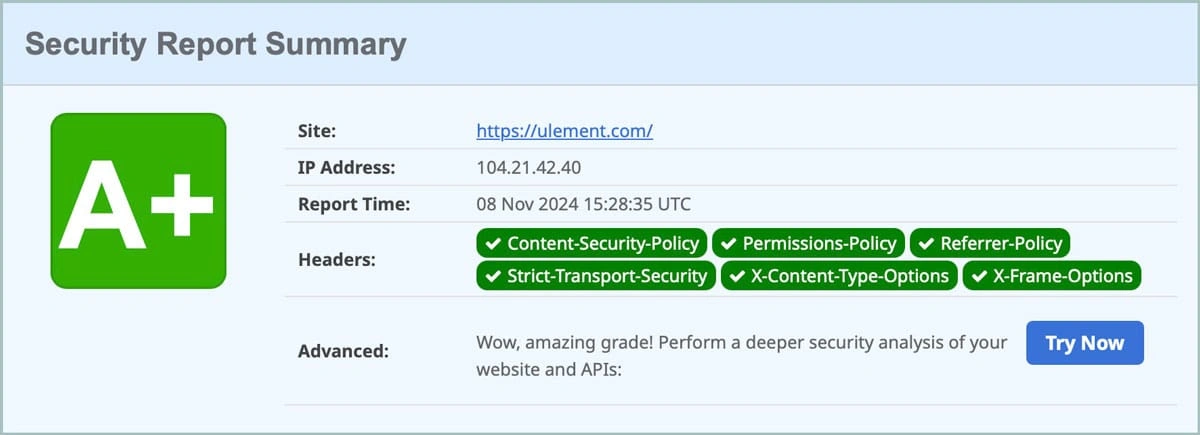
Another simple way to verify is test their website’s security header, security headers protect against common web attacks, but many companies lack the knowledge to implement them correctly.
DIY Website Maintenance vs Hiring a Professional
Cost Side-by-Side Comparison
Cost Breakdown: Subscription Fees vs. Your Billable Hours
|
Aspect |
DIY Approach |
Professional Service |
|---|---|---|
|
Monthly Tools |
RM50 – 150 (security plugins, backup services) |
RM300 – 800 (full service included) |
|
Time Investment |
8 – 15 hours monthly |
15 minutes monthly (reviewing reports) |
|
Opportunity Cost |
RM800 – 1,500 (at RM100/hour) |
Minimal |
|
Emergency Response |
our problem, your time |
Covered in service |
|
Learning Curve |
20 – 40 hours initially |
None |
|
Total Monthly Cost |
RM850 – 2,000 |
RM400 – 800 |
Time Commitment: Hours Per Month vs. Minutes
DIY Time Breakdown:
- Security monitoring and updates: 3-4 hours
- Performance optimisation: 2-3 hours
- Software updates and testing: 2-4 hours
- Backup verification: 1 hour
- Content updates and SEO: 4 -8 hours
- Emergency troubleshooting: 2-8 hours (unpredictable)
Professional Service Time:
- Review monthly reports: 15 minutes
- Communicate change requests: 15 minutes
- Review performance improvements: 10 minutes
Required Skills: Technical Expertise vs. None
DIY Requirements:
- WordPress administration
- Basic HTML/CSS knowledge
- Understanding of hosting and DNS
- Security best practices awareness
- SEO fundamentals
- Database management basics
- Troubleshooting mindset
Professional Service Requirements:
- None, just the ability to communicate your business needs
Accountability & Risk: Who Fixes It When It Breaks?
DIY Scenario:
When something breaks, you’re responsible for diagnosis, research, implementation, and testing. If your fix causes additional problems, you handle those too. The buck stops with you.
Professional Scenario:
Service providers are contractually obligated to maintain your site’s health. They carry professional liability insurance and have escalation procedures for complex issues.
The Hybrid Approach: A Smart Compromise for Savvy Business Owners
Some Malaysian SMEs successfully combine DIY and professional elements:
- Content Management: Handle your own blog posts, page updates, and basic content changes while leaving technical maintenance to professionals.
- Scheduled Professional Reviews: Maintain your site yourself but schedule quarterly professional audits to catch issues you might miss.
- Emergency-Only Support: Handle routine maintenance yourself but have a professional service on retainer for emergencies or complex issues.
- Training Plus Support: Invest in professional training to handle basic tasks while maintaining a support relationship for advanced needs.
This approach works best for technically-inclined business owners who want to maintain some control while ensuring professional backup when needed.
Decision Time: A 5-Question Quiz to Find Your Best Path
What is your monthly budget for website maintenance?
- A. Under RM200: DIY with basic tools might be your only option initially
- B. RM200 – 500: Basic professional service or comprehensive DIY setup
- C. RM500 – 1,000: Full professional service with good support levels
- D. Over RM1,000: Premium professional service with priority support
How much time can you realistically commit each week to website maintenance?
- A. Less than 1 hour: Professional service is practically necessary
- B. 1 – 2 hours: Professional service recommended for efficiency
- C. 2 – 4 hours: DIY could work with proper tools and processes
- D. 4+ hours: DIY viable if you enjoy technical work
How critical is your website to your daily revenue?
- A. Not critical (brochure site): DIY acceptable with good backups
- B. Moderately critical (some leads/sales): Professional service recommended
- C. Highly critical (primary sales channel): Professional service essential
- D. Mission critical (majority of revenue): Premium professional service required
What is your technical comfort level?
- A. Complete beginner: Professional service strongly recommended
- B. Basic user (email, social media): Professional service recommended
- C. Comfortable with technology: DIY possible with dedication
- D. Technical background: DIY could work well
Do you want to learn these skills or focus elsewhere?
- A. Prefer to focus on core business: Professional service
- B. Interested in learning but time-constrained: Hybrid approach
- C. Enjoy technical challenges: DIY could be rewarding
- D. Want to build internal capabilities: DIY with training investment
Scoring:
- Mostly A’s: Professional service is your best bet
- Mix of A’s and B’s: Consider professional service or hybrid approach
- Mostly B’s and C’s: Hybrid approach might work well
- Mostly C’s and D’s: DIY could succeed with proper commitment
FAQ:
Your Website is an Asset, Maintain It Wisely
Your website is more than a digital brochure, it’s a revenue-generating asset that needs consistent care to perform optimally. Whether you choose DIY maintenance, professional services, or a hybrid approach depends on your budget, time, technical skills, and business priorities.
DIY maintenance can work for simple sites with non-critical business functions, but it requires significant time investment and carries risks. Professional maintenance offers expertise, reliability, and peace of mind at a predictable monthly cost.
Most Malaysian SMEs find professional maintenance provides better ROI when they factor in opportunity costs, risk mitigation, and performance improvements. The key is choosing a service provider that understands your business needs and offers transparent, value-driven maintenance packages.
Ready to ensure your website performs optimally without consuming your valuable time? Get a free website health audit to understand your current maintenance needs and explore professional options tailored to Malaysian businesses.
If you’ve decided that your time is better spent growing your business, let’s talk.
