Choosing a web design partner is one of the most important decisions you will make for your business. The right partner can deliver a powerful asset that fuels your growth for years. The wrong one can deliver a costly, underperforming website that becomes a source of constant frustration. The difference often comes down to asking the right questions.

Introduction: Beyond the Portfolio
Choosing the wrong web design agency isn’t just an expensive mistake—it can set your business back months or even years. Many Malaysian business owners learn this the hard way, investing in websites that look impressive but fail to deliver traffic, leads, or measurable growth.
The difference between a successful website project and a costly disappointment often comes down to asking the right questions upfront. These five critical questions will help you identify genuine strategic partners from order-takers who simply follow briefs without questioning whether they’ll actually help your business succeed.
Question 1: “What is your strategic process before you start designing?”
Why this matters: Agencies that jump straight into design without a discovery phase are essentially building your website blind. They’re creating something that looks nice but may not serve your business goals or audience needs.
What You Should Hear:
A comprehensive discovery phase that includes:
- Business goals analysis: Understanding your revenue model, target customers, and growth objectives
- Competitive research: Analysing what works (and doesn’t work) in your industry
- User persona development: Identifying who actually visits your site and what they need
- Site architecture planning: Mapping out logical page structures and user journeys before any visual design begins
- Content strategy: Determining what information needs to be prioritised and how it should be presented
A data-driven approach that considers:
- Current website analytics (if you have an existing site)
- Industry best practices for your sector
- Technical requirements for search engine visibility
- Mobile-first design principles
Red Flags:
- “We’ll start with a few design concepts and see what you like”
- No mention of research or strategy
- Immediate focus on colours, logos, or visual preferences
- Template-based approach without customisation
Expert insight: The discovery phase typically represents 15-20% of a project’s timeline but determines 80% of its success. Agencies that skip this step are essentially guessing what will work for your business.

Professional Web Design & WordPress Development Malaysia
Question 2: “How will this new website improve my SEO?”
Why this matters: Many agencies treat SEO as an add-on service rather than a foundational requirement. Websites built without SEO considerations from day one often require expensive rebuilds to achieve search visibility.
What You Should Hear:
Technical SEO built from the ground up:
- Site architecture designed for search engine crawlability
- Page speed optimisation as a core development priority
- Mobile-first, responsive design that passes Core Web Vitals
- Proper URL structure and internal linking strategy
- Schema markup implementation for rich search results
Content and keyword strategy integration:
- Keyword research informing page creation and content structure
- Meta titles and descriptions optimised for click-through rates
- Header tag hierarchy that supports both users and search engines
- Image optimisation and alt text best practices
Ongoing SEO considerations:
- How the content management system supports SEO best practices
- Analytics and Search Console setup for performance monitoring
- Local SEO optimisation (crucial for Malaysian businesses)
Red Flags:
- “We’ll add SEO after the website is built”
- No mention of technical SEO requirements
- Vague promises about “SEO-friendly design”
- Treating SEO as a separate, optional service
Most business owners don’t realise that retrofitting SEO onto an existing website costs 3-5 times more than building it correctly from the start.

The Ultimate Guide to Actionable Malaysia SEO Tips for [year]
Question 3: “Can you show me case studies with measurable results?”
Why this matters: A pretty portfolio tells you nothing about business impact. You need evidence that the agency’s work actually drives traffic, generates leads, and supports business growth.
What You Should Look For:
Measurable business outcomes:
- Traffic growth percentages (organic search, total visitors)
- Lead generation improvements (form submissions, enquiries, calls)
- Conversion rate improvements
- Search ranking improvements for relevant keywords
- Page speed improvements and user experience metrics
Before and after comparisons:
- Screenshots showing actual analytics data
- Specific timeframes for results
- Context about the business and industry
- Challenges overcome during the project
Client testimonials focused on results:
- Specific mentions of business growth
- Quantified improvements
- Long-term relationships and ongoing results
Red Flags:
- Only showing visual designs without performance data
- Vague claims about “increased engagement”
- No access to actual clients for references
- Case studies focused purely on aesthetics
Reality check: Agencies with strong case studies are proud to share specific numbers and connect you with satisfied clients. Those who avoid this conversation often lack measurable results.

Post-Migration SEO Audit: The Ultimate Checklist & Guide to Traffic Recovery
Question 4: “What happens after the website is launched?”
Why this matters: Launch day is just the beginning. Websites require ongoing maintenance, security updates, and performance monitoring to remain effective business tools.
What You Should Expect:
Comprehensive training and handover:
- Content management system training tailored to your team
- Documentation of all login credentials and account access
- Clear instructions for common tasks and updates
- Emergency contact procedures for urgent issues
Ongoing maintenance and support:
- Regular security updates and plugin maintenance
- Performance monitoring and optimisation
- Backup procedures and disaster recovery
- Technical support response times and availability
Long-term partnership approach:
- Regular performance reviews and recommendations
- Growth-focused improvements and optimisations
- Transparent pricing for additional work
- Proactive communication about issues or opportunities
Red Flags:
- “You’re on your own after launch”
- No training or documentation provided
- Vague maintenance packages without clear deliverables
- Unwillingness to transfer full website ownership
Critical consideration: Agencies that disappear after launch leave you vulnerable to security issues, performance problems, and missed growth opportunities.

Smart Web Development with Ongoing Website Support for Sustainable Business Growth
Question 5: “Who will own the website, and what are the ongoing costs?”
Why this matters: Hidden costs and ownership restrictions can trap you in expensive, dependent relationships with agencies who essentially hold your website hostage.
What You Should Receive:
Complete website ownership:
- Full admin access to your content management system
- Domain registration in your business name
- Hosting account under your control (or clear transfer process)
- All source files, licenses, and intellectual property rights
- Comprehensive documentation of all accounts and access
Transparent pricing structure:
- Clear breakdown of one-time vs. ongoing costs
- Hosting and domain registration fees explained
- Maintenance package options with specific deliverables
- Additional work pricing (hourly rates, project estimates)
No lock-in arrangements:
- Freedom to move hosting or change agencies
- No penalties for ending maintenance agreements
- Full access to modify or update your website
- Clear ownership of all content and custom development
Red Flags:
- Vague ownership terms or shared access arrangements
- Hosting bundled with design services at inflated prices
- Maintenance contracts with cancellation penalties
- Refusal to provide full documentation or access credentials
Legal reality: In Malaysia, custom website development typically transfers full ownership rights to the client upon final payment, unless explicitly agreed otherwise in writing.

Ultimate Guide to Website Ownership and Transparency for Malaysian Businesses
Recognising and Avoiding Common Empty Promises in Web Design
The Malaysian web design industry is unfortunately filled with agencies making unrealistic promises to win projects. Here are the most common empty promises and how to verify if an agency can actually deliver on their claims:
Empty Promise #1: “We’ll Get You to #1 on Google”
The Reality: No one can guarantee specific search rankings. Google’s algorithm considers thousands of factors, and rankings fluctuate constantly.
How to Verify:
- Ask for specific case studies showing ranking improvements over 6-12 month periods
- Request to see their own website’s rankings for competitive keywords
- Check if they explain the difference between ranking and traffic/conversions
- Look for mentions of white-hat SEO practices and long-term strategies
What professionals say instead: “We’ll implement proven SEO best practices and show you measurable improvements in organic traffic and search visibility over time.”
Empty Promise #2: “Lightning-Fast Page Speed” (Without Showing Proof)
The Reality: Page speed depends on hosting, images, code quality, and ongoing maintenance. Many agencies promise speed but deliver bloated websites.
How to Verify:
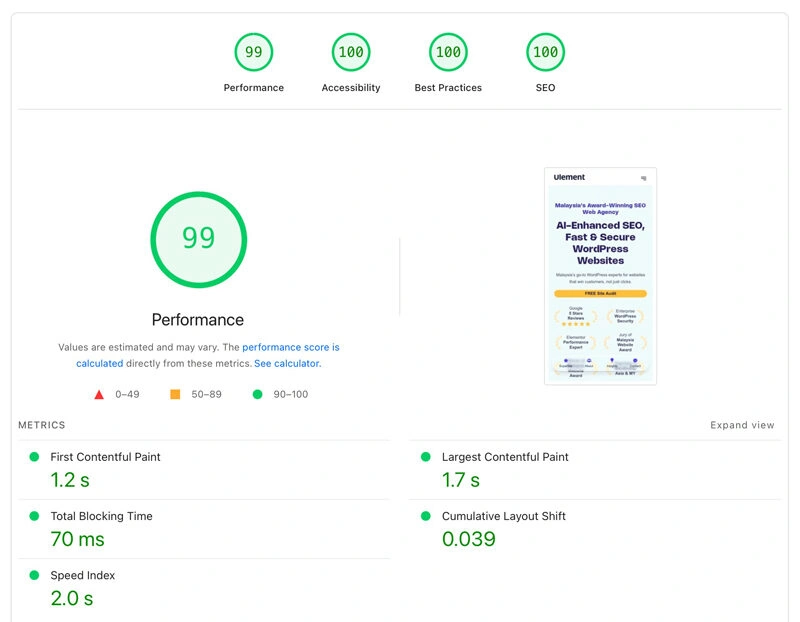
- Test their own websites using Google PageSpeed Insights
- Request before/after speed test results from previous client projects
- Ask about specific speed optimisation techniques they use (image compression, caching, CDN, code minification)
- Check if they mention Core Web Vitals and Google’s speed requirements
Red flags: Agencies that can’t explain technical speed optimisation or won’t show their own site’s performance scores.
Empty Promise #3: “Perfect Meta Titles & Descriptions for SEO”
The Reality: Many agencies stuff keywords into meta tags without understanding user intent or click-through optimisation.
How to Verify:
- Ask to see examples of meta titles and descriptions they’ve written for other clients
- Check if they understand character limits (titles: ~60 characters, descriptions: ~160 characters)
- Look for evidence they research competitors’ meta tags and user search intent
- Ask how they track click-through rates and optimise based on performance
Test their knowledge: Ask them to critique the meta tags on their own website or explain why they chose specific wording.
The Ultimate Guide to Actionable Malaysia SEO Tips for [year]
Empty Promise #4: “Mobile-First Design” (While Showing Desktop-Only Mockups)
The Reality: True mobile-first design starts with mobile wireframes and considers thumb-friendly navigation, not just responsive resizing.
How to Verify:
- Ask to see mobile wireframes and user flow diagrams in their design process
- Test their own website on mobile devices for usability
- Request mobile performance metrics from previous projects
- Check if they discuss thumb zones, touch targets, and mobile-specific UX considerations
Red flags: Agencies that only show desktop designs or can’t explain mobile-specific design challenges.
Empty Promise #5: “100% Original, Custom Design”
The Reality: Many agencies use modified templates or pre-built components while claiming everything is custom.
How to Verify:
- Ask for detailed design process documentation showing custom wireframes and mockups
- Request to see design system documentation and style guides they create
- Look for unique design elements in their portfolio that couldn’t be template-based
- Ask about design ownership and source files they’ll provide
Test: If their portfolio shows very similar layouts or design patterns across different industries, they may be using templates.
Empty Promise #6: “Complete Website in 3-5 Days”
The Reality: Quality websites require discovery, planning, design, development, testing, and revision cycles that can’t be rushed.
How to Verify:
- Ask for a detailed project timeline showing each phase
- Request information about their quality assurance and testing process
- Check if they mention content creation, SEO setup, and training time
- Look for evidence of revision rounds and client feedback integration
Professional timeline: A proper business website typically takes 8 – 12 weeks minimum, including discovery, design, development, and testing phases.
Empty Promise #7: “Bulletproof Security & Complete Protection”
The Reality: Website security is an ongoing process, not a one-time setup. Many agencies promise “bulletproof” or “100% secure” websites without implementing proper security measures or explaining ongoing maintenance needs.
How to Verify:
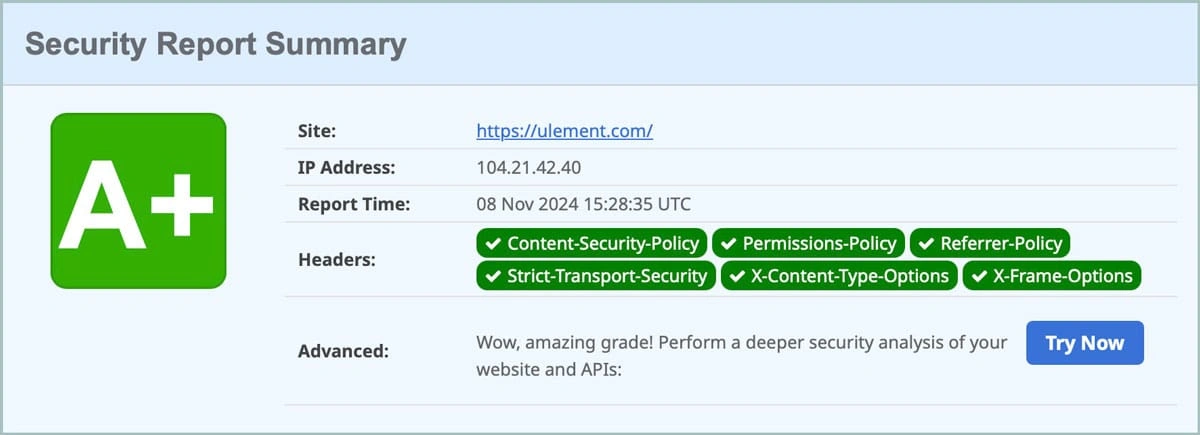
- Ask them to test their own website’s security headers using tools like Security Headers or Mozilla Observatory
- Request documentation of security measures they implement (SSL certificates, firewalls, secure headers, regular updates)
- Check if they mention specific security protocols like Content Security Policy (CSP), X-Frame-Options, or HTTPS enforcement
- Ask about their security update and monitoring procedures for ongoing protection
What to Test Yourself:
- Security Headers Check: Visit securityheaders.com and test their website URL
- Look for grades A or B (anything below C is concerning)
- Check for missing security headers like CSP, HSTS, or X-Content-Type-Options
- SSL Certificate Verification: Check if their website:
- Forces HTTPS redirect
- Has a valid, up-to-date SSL certificate
- Shows the padlock icon in browsers
- Basic Security Scan: Use free tools like:
- Qualys SSL Labs to test SSL configuration
- VirusTotal for basic malware scanning
- Google Safe Browsing to check reputation
Red Flags in Security Promises:
- “100% hack-proof” claims (no website is completely immune)
- Vague security language without specific implementation details
- One-time security setup without ongoing monitoring/updates
- No mention of backup procedures or disaster recovery
- Reluctance to show their own security test results
- No ongoing maintainance services
What Professional Agencies Say Instead:
- “We implement industry-standard security measures including SSL, security headers, and regular updates”
- “Our security approach includes both technical implementation and ongoing monitoring”
- “We follow OWASP guidelines and can show you our security testing results”
- “Security requires ongoing maintenance – here’s our update and monitoring process”
Additional Security Verification Steps:
- Ask about their hosting security: Do they use reputable hosts with firewalls and DDoS protection?
- Check update procedures: How do they handle WordPress, plugin, and theme updates?
- Backup strategy: What’s their backup frequency and recovery testing process?
- Malware monitoring: Do they use security plugins or monitoring services?
- Incident response: What happens if the site gets compromised?
The Bottom Line: Legitimate agencies will welcome security testing and can explain their security measures in detail. If an agency’s own website fails basic security tests, they’re not qualified to secure yours.

WordPress Security Setup: A Complete Guide
Empty Promise #8: “Premium Themes & Plugins Included”
The Reality: Many agencies use unlicensed (pirated/nulled) themes and plugins to cut costs while claiming to provide “premium” solutions. This creates serious security, legal, and maintenance risks for your website.
Why Licensed Themes & Plugins Matter:
- Security updates: Licensed products receive regular security patches and compatibility updates
- Official support: Access to developer documentation and technical support
- No malware risk: Nulled themes/plugins often contain hidden malware or backdoors
- Legal compliance: Using licensed software protects you from copyright infringement
- Long-term maintenance: Updates ensure compatibility with new WordPress versions
How to Verify Licenses:
- Ask for License Documentation:
- Request license keys and purchase receipts for all premium themes/plugins
- Verify licenses are registered under your business name, not the agency’s
- Check license renewal dates and support periods
- Check WordPress Dashboard:
- Look for license activation sections in premium plugin settings
- Verify that plugins show “Licensed” or “Active License” status
- Check for available updates (unlicensed plugins often can’t update)
- Test Update Availability:
- Licensed plugins/themes receive automatic update notifications
- Try updating a plugin – unlicensed versions will fail or require manual uploads
- Check if support documentation and changelogs are accessible
- Use License Verification Tools:
- Some plugins provide license status checking functions
- Security scanners can detect nulled or modified code
- Ask the agency to demonstrate license management in your WordPress admin
Questions to Ask Agencies:
- “Will you provide all license keys and transfer ownership to us?”
- “How do you manage theme and plugin updates?”
- “Can you show me the license status in the WordPress dashboard?”
- “What happens to licenses when our project ends?”
Red Flags:
- No Admintrator access provided to you
- Reluctance to show license status in WordPress admin
- Vague answers about plugin licensing and updates
- Unusually low pricing that suggests corner-cutting on licenses
- No documentation provided for premium themes/plugins used
- Manual plugin uploads instead of automatic updates
What Professional Agencies Do:
- Purchase licenses under client names or transfer ownership
- Provide complete license documentation and renewal schedules
- Use reputable marketplaces (WordPress.org, CodeCanyon, developer websites)
- Explain ongoing licensing costs upfront
- Set up proper license management systems
The Bottom Line: Agencies using unlicensed themes and plugins are essentially building your website on a foundation of security vulnerabilities and legal risks. Always verify that any premium components come with proper licenses transferred to your ownership.

Top Security Measures to Protect Your WordPress Website in [year]
How to Verify Agency Claims: Your Due Diligence Checklist
Technical Verification Steps:
- Test their own website using free tools:
- Google PageSpeed Insights for speed
- Mobile-Friendly Test for mobile usability
- SEO analysis tools for their own rankings
- Review their case studies for:
- Specific metrics and timeframes
- Before/after comparisons
- Client testimonials mentioning actual results
- Ask for references and actually contact previous clients about:
- Project timeline accuracy
- Communication quality
- Post-launch support
- Actual results achieved
Red Flags That Indicate Empty Promises:
- Rank No 1 in search results
- Vague timelines without specific deliverable dates
- Guarantee-heavy language without explaining methodology
- Reluctance to show their own website’s performance
- Portfolio without context (no results, timelines, or challenges explained)
- Pressure tactics emphasising urgency over quality process
Green Flags of Trustworthy Agencies:
- Transparent process with documented methodologies
- Realistic timelines that account for quality and revisions
- Evidence-based claims supported by data and case studies
- Educational approach that helps you understand their work
- Long-term thinking about your website’s growth and maintenance
Remember: Agencies making empty promises are usually competing on unrealistic expectations rather than genuine expertise. The best web design partners under-promise and over-deliver, setting realistic expectations while consistently exceeding them through quality work and attention to detail.
My Expert Take: Strategy Over Price
After years of consulting for businesses, I’ve learned that you can identify a great web partner not just by the answers they give, but by the questions they ask. An order-taker will ask what you want. A strategic partner will ask what you want to achieve.
They will be as interested in your business model as they are in your brand colours. They will challenge your assumptions and provide expert guidance. This might make the initial process more intensive, but it is the only way to ensure the final product is a powerful business asset, not just a beautiful but ineffective design.
FAQ
Making an Informed Decision
These five questions separate professional web design agencies from order-takers who simply implement requests without considering business impact. The agencies worth working with will welcome these questions. They understand that informed clients make better partners and achieve superior results.
Don’t let a beautiful-looking website fool you into thinking it will automatically drive business growth. Ask the hard questions upfront, demand specific answers, and choose partners who demonstrate genuine commitment to your success.
Remember: Your website is likely one of your most important business investments. A few hours of due diligence during agency selection can save you months of frustration and thousands of ringgit in costly mistakes.
Ready to work with a strategic partner who focuses on results?
